

Run Tables
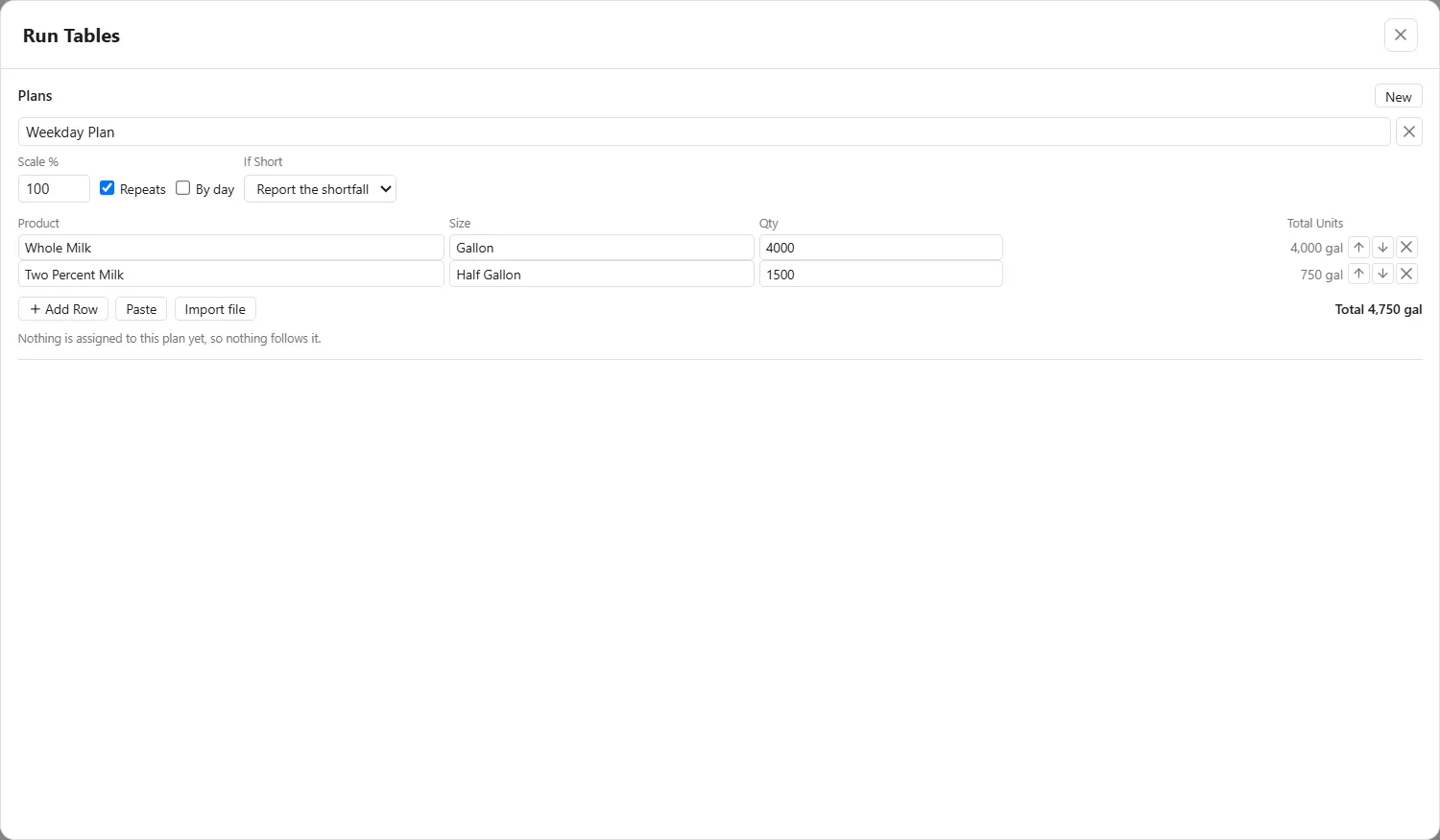
A run table is a plant’s production plan, written in the order it will be run: which product, in which container size, and how many containers. You write it once in the Run Tables window and assign it to the elements that follow it, so a filler and the machines around it work from the same plan.
Opening the window
Section titled “Opening the window”The Definitions card has a Run Tables line with the number of run tables the model holds and an Open button. The window opens on the plans, under Plans, with a New button. Like the other Definitions windows it has no OK and no Cancel: every change is already in the model, and Ctrl+Z takes it back.
A plan
Section titled “A plan”New adds a blank plan, with these parts:
- The name box, which is the name every assignment picker lists the plan under. The X beside it deletes the plan.
- Scale %, a percent applied to every row’s quantity, so 150 runs the plan at half again. It starts at 100, and a variable’s name is accepted, so demand can be a scenario.
- Repeats. Checked, the list starts over at row one in each window. Cleared, it runs once and stops.
- By day, which gives each weekday its own quantity. It is described below.
- If Short, which says what happens when the plant cannot make the whole plan in its window. Report the shortfall ends the rows at the window and starts the next day clean, so the report shows whether the plan fits the plant. Finish on overtime stretches the window until the last row is done, with the overtime priced from the elements’ hourly costs. Carry it forward makes the unmade balance the first rows of the next window and reports the growing backlog.
The rows
Section titled “The rows”Each row has four columns.
| Column | What goes in it |
|---|---|
| Product | The material this row makes. It must be one the model defines. |
| Size | The container format the row is packed in. It must be one the model defines. |
| Qty | How many containers: a number, a variable’s name, or REMAINDER on the last row, which runs until the source reaches its heel. |
| Total Units | Worked out for you, never typed: the quantity times the format’s size, in the material’s own unit. |
Where a row has no plain number, Total Units says “the remainder” or “depends on” and a variable. Where a row cannot be worked out it says why: “unknown product”, “unknown size” or “units do not match”. Row order is production order, and the up and down buttons on a row move it. The total shows under the rows, for example “Total 4,750 gal”.
Add Row adds a blank row. Paste and Import file read a plan from a spreadsheet or from a CSV or Excel file. Each shows a preview, with Product, Size, Quantity and Skip to choose for every column, and nothing lands until you press Add N rows, as it does in The Work Table.
Planning each weekday
Section titled “Planning each weekday”Check By day to say what each weekday makes. Every row gets seven cells, Mon to Sun, filled from its Qty so the plan stays the same, and Qty becomes the week added up, worked out for you. A Day totals row appears under the rows. A cell takes a number, a variable’s name, REMAINDER on the last row, or off, and typing 0 gives off. The arrow beside a row writes Monday’s cell across its week. Clearing By day goes back to one Qty per row and discards the week.
Who follows a plan
Section titled “Who follows a plan”A plan does nothing until an element reads it. Assign it in the Run Table box on the General tab of:
- a Filler, whose run list is then generated from the table, one row per table row, with the format from Size and the quantity from Qty;
- a Manifold set to By product, following the plan, which sends material to the member already holding the current row’s product, or else to an empty clean one;
- a Unit Operation that runs continuously, which campaigns through the rows in order, its input proportions becoming each row’s recipe.
The element’s Reads It As box shows its part and cannot be changed: Producer - makes the row, Filler - packs the row or Router - sends the row. The line at the foot of each plan lists what reads it, such as “Filler 1 fills it”, or reads “Nothing is assigned to this plan yet, so nothing follows it.”
After a run, the Run Table section of the Bulk tab sets the plan against what was made. See The Bulk report, Filler and Manifold.