

Gate
A Gate controls when entities are allowed to move on. It does no work and holds nothing of its own; it opens and closes, releasing entities while open and making them wait while closed. Use it for a barrier that follows a schedule, responds to a signal, or waits for downstream demand.
Setting up a gate
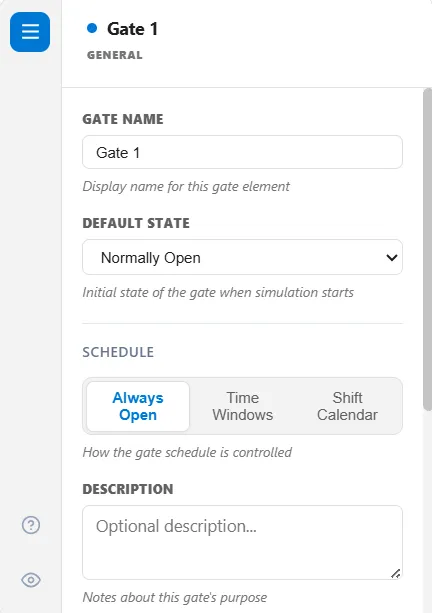
Section titled “Setting up a gate”A gate’s General tab reads top to bottom:
- Gate Name: the display name for this gate.
- Default State: whether the gate begins Normally Open or Normally Closed when the run starts.
- Schedule: three buttons, Always Open, Time Windows, and Shift Calendar, that decide whether the clock plays any part in when the gate opens.
- The control that choice reveals: pick Time Windows or Shift Calendar and its fields appear directly beneath the buttons.
Default State is ignored only when a shift calendar is actually attached. In every other case the engine reads it, including when you have chosen Shift Calendar but not yet picked a calendar, so a gate never starts in an undefined state.
Schedule
Section titled “Schedule”The Schedule buttons put the gate on a clock, so it opens and closes at set times instead of waiting on a condition or on downstream demand.
| Button | What drives the gate |
|---|---|
| Always Open | Nothing. The clock plays no part, and the gate is governed by its conditions, its blocking mode, or logic |
| Time Windows | A list of open periods you write, repeating every week |
| Shift Calendar | A shift schedule you have already defined |
Time Windows
Section titled “Time Windows”Each window is a start time, an end time, and the days it applies to, plus a few settings of its own:
- Open during window or Closed during window: what the gate does while the window is on.
- Every week or One time only: whether the window repeats every week on the ticked days or fires once.
- Repeat every N days and First on day, both optional: Repeat every is how many days apart the window repeats (left blank, it repeats every day it is scheduled for), and First on day is the first day of the run it lands on (left blank, day 0).
Add a freeze adds a window that shuts the gate for whole days on a repeating rhythm, such as the last days of a fortnightly sprint, and every cell stays editable. A new window starts life as 08:00 to 17:00 on weekdays, which you then adjust.
Outside every window the gate takes its Default State. A window temporarily overrides it.
The days you tick are real days of the week, lined up against the calendar date your run’s Start Day maps to, so a Monday-to-Friday window really does skip the weekend.
Two things to watch:
- A weekly window may run past midnight. A night shift of 22:00 to 06:00 is accepted: it starts on each ticked day and runs into the next, and the window is marked Overnight window.
- Choosing Time Windows and leaving the list empty is the same as no schedule at all. The gate simply holds its Default State, with no warning, so add at least one window.
Shift Calendar
Section titled “Shift Calendar”Choosing Shift Calendar hands the gate to a shift calendar. The gate opens when the shift comes on and when a break ends, and closes when the shift goes off and when a break starts, so a gate can follow the working hours of the area it guards without you restating them.
Naming a shift schedule that no longer exists stops the run with a clear error rather than quietly ignoring the setting.
A gate running as Pull or as a Kanban control is driven entirely by downstream demand, so it cannot also be on a clock. On those gates the Default State and the Schedule buttons stay visible but dimmed, with the reason on hover and a Clear button where a value is stored, and switching Pull or Kanban on clears any stored schedule. See Gate Blocking and Gate Flow Control.
Other ways to open and close a gate
Section titled “Other ways to open and close a gate”Beyond the schedule, one or more mechanisms change the gate’s state during the run, and you can combine them:
- On a condition: give an open or close condition, a live expression over the model’s state. This is how a gate reacts to a signal: a condition such as
Signal("Go").Activeopens the gate the moment that signal is sent (see Signal). - From action logic: open or close the gate directly with
OpenGate,CloseGate, orToggleGatefrom anywhere in the model. Once logic takes control this way, it keeps control for the rest of the run. - On downstream demand: run the gate as a pull or Kanban control, or cap the work in progress downstream, so it releases only when the next step has room.
How many to release
Section titled “How many to release”While the gate is open, the Release Mode decides how many entities go through: one at a time, a set number, everything at once, at a limited rate, or within a repeating window.
Order and capacity
Section titled “Order and capacity”Entities that arrive while the gate is closed wait in the gate’s own queue. The Queue Order sets who leaves first, and a Queue Capacity makes the gate refuse new entities once full, backing them up upstream. The Blocking Mode decides what happens at the other end, when the gate is open but the next step has no room. An entity can also be sent straight to a gate from action logic with SEND, and it arrives exactly as any other entity does.
Reacting to open and close
Section titled “Reacting to open and close”On the Events tab you can run a few statements when the gate opens, closes, releases an entity, or blocks one, for counting or other side effects. These hooks run action logic minus the statements that cannot wait, so read that article before writing one.
The Advanced tab
Section titled “The Advanced tab”- Value Classification says how the time an entity spends held at the gate is counted: Non-Value-Added, the default, or Required Non-Value-Added for a hold the process requires, such as a batch release or a regulatory window. A required hold counts toward the entity’s Required Non-Value-Added time, and an ordinary one toward its Non-Value-Added time.
- Bucket Collection overrides, for this gate’s waiting queue, the master Queue bucket collection switch in Simulation Options: Use master setting (the default), On or Off. What it collects feeds the Queue Diagnostics view of the Output Report.
- Show queue fill indicator, under Animation Display, puts a thin vertical bar on the edge of the gate that fills as its waiting queue does. Threshold (% of capacity) is the warning level, 80 to begin with: the bar is green, turns yellow from half the threshold, red from three-quarters of it, and red and pulsing above it. Scale measures the fill against % of capacity or % of historical max, the largest fill seen so far in the run.
A route into a gate
Section titled “A route into a gate”Action logic on a route whose destination is a gate runs, so a value set there is set. A wait in that logic holds the entity at the source of the route.
The gate’s other tabs
Section titled “The gate’s other tabs”Every setting above has its own article:
- Gate Flow Control: kanban cards and work-in-progress limits
- Gate Release: how many go through per opening
- Gate Events: the four hooks
- Gate Conditions: opening and closing from model state
- Gate Blocking: push and pull
All seven tabs show by default: General, Flow Control, Release, Events, Conditions, Blocking, and Advanced. The only tab a gate hides on its own is Release, under a Kanban control. The eye icon in the gate’s tab strip lets you hide any tab you do not use.