

Import Recipe
Import Recipe turns a recipe you can paste, a formula and its ordered steps, into a working model, with no AI involved. Open it from File ▸ Import Recipe.
The two grids
Section titled “The two grids”You paste two things, and each has its own rules.
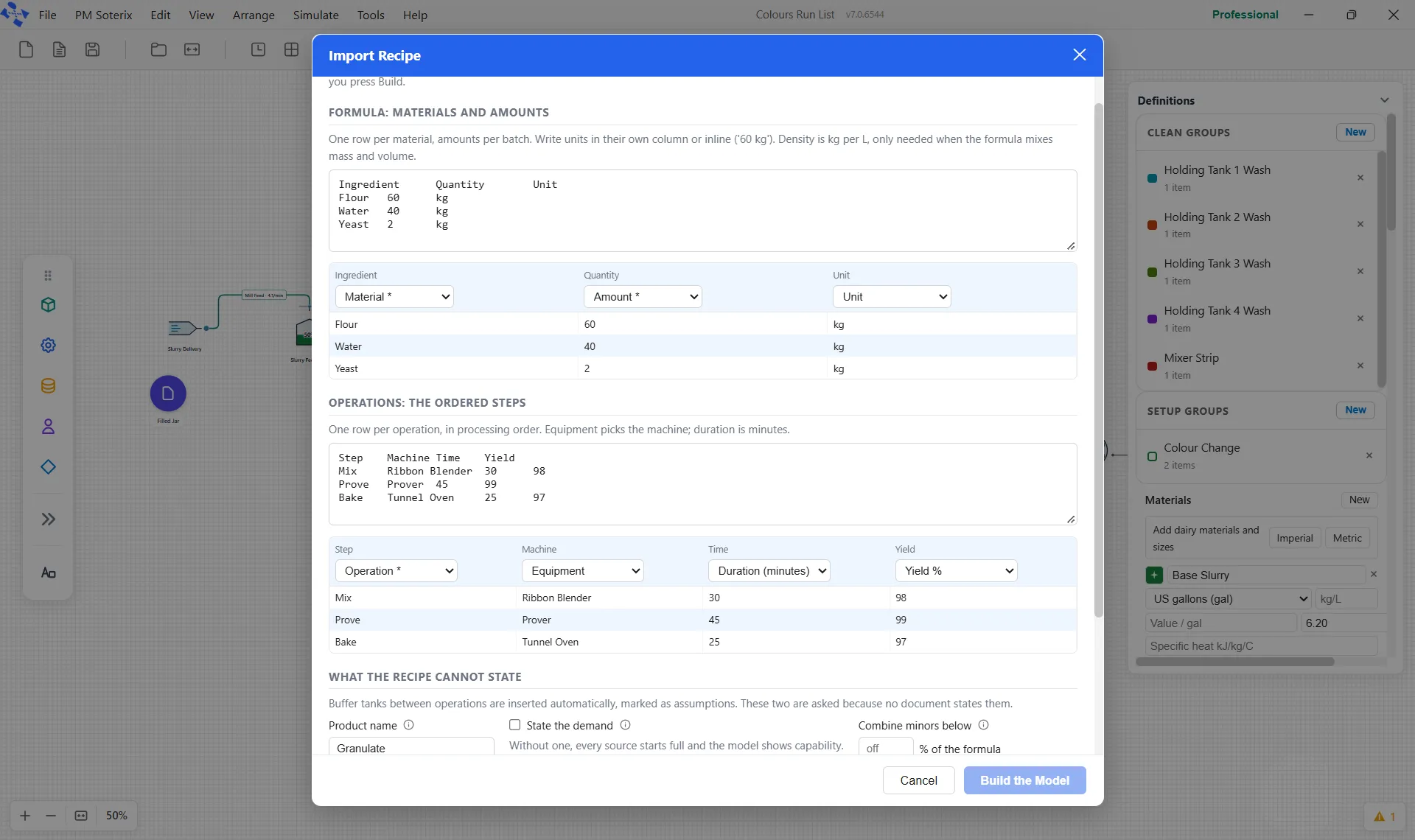
Formula: materials and amounts. One row per material, with amounts per batch. Write units in their own column or inline, such as 60 kg. Density is only needed when the formula mixes mass and volume, because that is the only time a conversion is required.
Operations: the ordered steps. One row per operation, in processing order. Equipment picks the machine, and the duration is in minutes.
Mapping the columns
Section titled “Mapping the columns”Columns are yours to map. The header row is read only to propose a mapping, never to decide it, so a recipe with unusual headings still imports.
The formula maps to Material, Amount, Unit, Input or Output and Density (kg per L). The operations map to Operation, Equipment, Duration (minutes), Yield % and Machines. Any column can also be set to Ignored. The starred targets, Material, Amount and Operation, are the ones it cannot do without.
What the recipe cannot state
Section titled “What the recipe cannot state”A recipe on paper does not say everything a running model needs, so the importer asks rather than assumes. It asks for the product name, whether to state a demand, how many of each machine there are, a threshold for combining minor ingredients, and how the document states its yields, per operation or cumulative down the route.
Buffering is not asked: a buffer tank is inserted between every consecutive pair of operations and marked as an assumption, because a model with no buffers cannot show queueing at all.
What it refuses
Section titled “What it refuses”The refusals happen at the preview, not halfway through a run. A unit problem blocks Build the Model, and the preview shows it in red under What will be built: no unit stated, a unit the importer does not know, or mass and volume mixed with no density. The yield basis is the only question that can hold up the build, and it is asked only when yields are pasted. Leaving it unanswered blocks Build the Model too, and the importer explains why rather than picking one:
The preview
Section titled “The preview”Before anything is built, the preview shows exactly what will be created: the counts of unit operations, tanks and materials, and the reminder that nothing lands until you build.
It then separates what you supplied from what it inferred. Pasted values are yours, user-provided and high confidence; everything below that line is an assumption the importer made, visible in the preview and editable on the canvas afterwards. The assumptions are tagged so you can read them at a glance: MATERIALS, SOURCES, DEMAND, BUFFERS, MACHINES, RATES, RECIPE, FORMULA and YIELDS. RECIPE appears when no product is named, so the product is called “Product”. FORMULA appears when minor ingredients were combined. YIELDS appears when the yield basis was assumed or a step has no yield. A second RATES line covers batch steps with no duration.
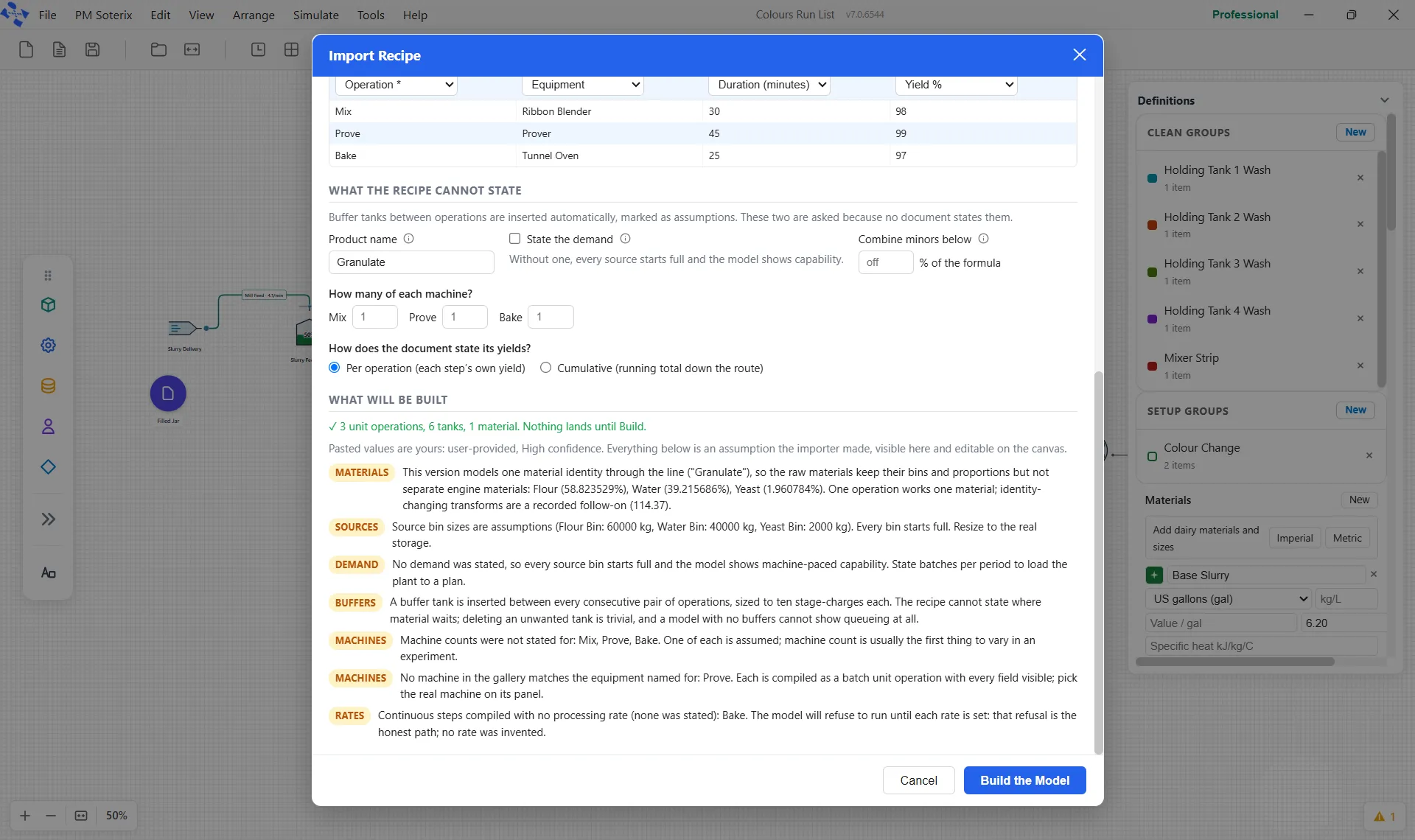
Where a continuous step arrived with no processing rate, the importer refuses to invent one:
Building it
Section titled “Building it”Build the Model checks the changes and applies them to the model on the canvas as one step you can undo with Ctrl+Z, then closes the window. It builds beside whatever is already on the canvas and replaces nothing, so the canvas does not need to be empty. The window itself is deliberate about accidents: Escape closes it, clicking the backdrop does not dismiss it, and Enter never submits.