

Emergency department modeling

ProcessModel models an emergency department the way it models any process: patients arrive, wait for a space, are seen and leave. The Healthcare industry puts that model into the department’s own words and gives you three things to work with: a palette, a lens and a report.
Choose Healthcare
Section titled “Choose Healthcare”Open View ▸ Show Industry Palette. On a model with no industry the panel opens with the question “Which industry?” and one card for each industry:
- Process plant reads “Tanks, lines, fillers, dairy and bulk”.
- Software delivery reads “A team, a plan of work, releases”.
- Healthcare reads “Patients, staff and the spaces they are seen in”.
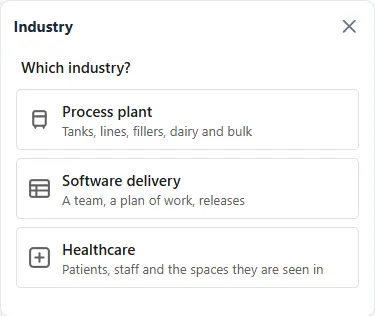
Choose Healthcare and the Emergency Department face opens in the panel. For how the industry palette works in general, see Industry palettes and the lens.
What the Emergency Department face gives you
Section titled “What the Emergency Department face gives you”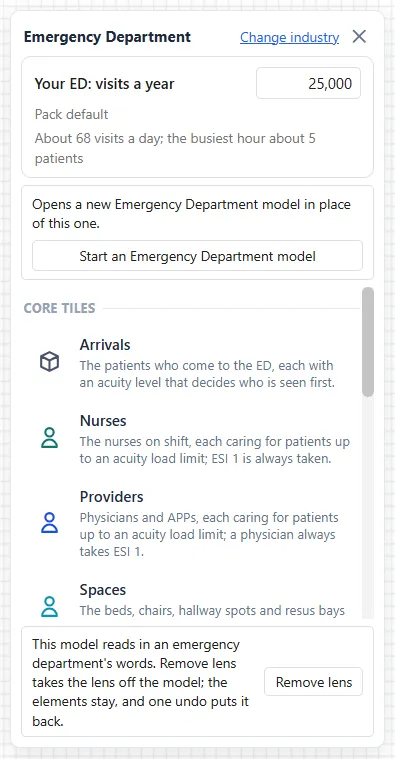
The palette. At the top of the face are the box Your ED: visits a year and the button Start an Emergency Department model. Below them are twelve tiles to drag onto the canvas, from Arrivals to Discharge / Admit. A tile arrives sized to your visits and wired to the tiles already on the canvas. See The Emergency Department palette and Visits a year and sizing.
The lens. A lens changes what you read, never what is computed. At the foot of the face a note says: “This model reads in an emergency department’s words. Remove lens takes the lens off the model; the elements stay, and one undo puts it back.” With the lens on, an Entity reads as a Patient, and the settings and the report use the department’s own terms. See Settings for an emergency department model.
The report. The Output Report of a model with the lens on shows a strip of seven headline tiles, a Rules strip under it, and six tabs of its own: Front Door, Flow, Getting Out, Crowding, Team and Spaces and Money. See The emergency department report: headline and rules, The emergency department report tabs and Cost per patient.
Where to begin
Section titled “Where to begin”There are two ways in.
- Start from a typical department. Under the visits box, the button Start an Emergency Department model builds a model for your size, with its run settings, in one step. See Start a typical emergency department.
- Build from the tiles. Enter your visits a year, then drag the tiles onto the canvas in any order. See The Emergency Department palette.
Either way, run the model as you run any other and read the result in the Output Report. Care models, which add a way of running the department, are in Care models.
The articles
Section titled “The articles”- Emergency department modeling, this article: the Healthcare industry and where to begin.
- The Emergency Department palette: the twelve tiles, dropping a tile and the right-click menu.
- Visits a year and sizing: the visits box, how every tile is sized, and the offer to resize.
- Start a typical emergency department: one button builds a whole model of your size.
- Care models: Provider in Triage, and how a scenario switches it on or takes it out.
- Settings for an emergency department model: Simulate ▸ Options, the Cost centre box, rooming needs and the department’s own words.
- The emergency department report: headline and rules: the seven headline tiles and the Rules strip.
- The emergency department report tabs: Front Door, Flow, Getting Out, Crowding, and Team and Spaces.
- Cost per patient: the Money tab.