

Designs
The design decides how PM Optimizer explores the combinations of your factors. It is the trade-off between how thorough the search is and how long it takes.
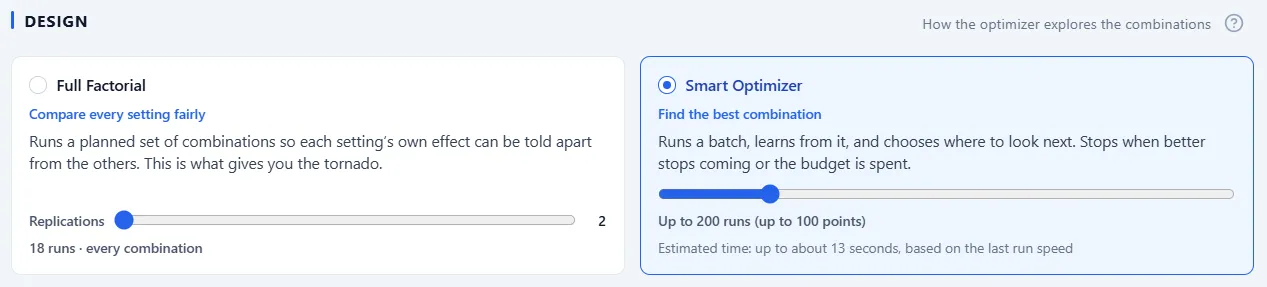
The two designs
Section titled “The two designs”- Full Factorial compares every setting fairly: it runs a planned set of combinations so each setting’s own effect can be told apart from the others, which is what powers the main-effects chart on Results. The card carries the Replications slider and a live count of the runs, and it warns you plainly when the grid gets heavy.
- Smart Optimizer, the default, finds the best combination: it runs a batch, learns from it, and chooses where to look next, stopping when better stops coming or the budget is spent. Its card carries the run budget. Covered in Smart Optimizer.
Each card updates as you add or remove factors, so you can weigh cost against thoroughness before you start.
Full Factorial needs factors it can list. A factor set to a smooth range of values has no combinations to enumerate, so the card disables itself and says which factor to give a step. The Smart Optimizer handles smooth ranges as they are.
When the grid is big: a planned slice
Section titled “When the grid is big: a planned slice”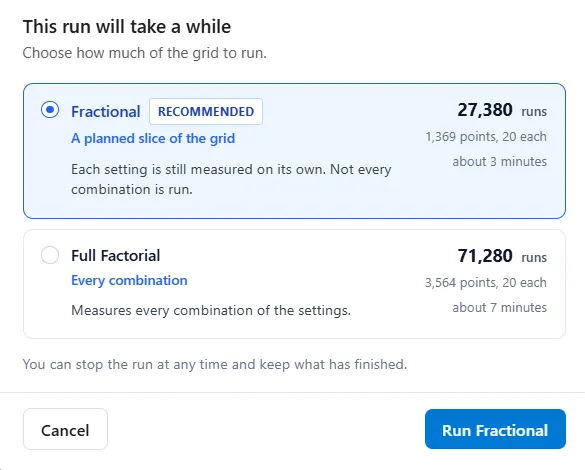
When a Full Factorial run would take a while, the run button asks before starting and offers a way out: Fractional, a planned slice of the grid that still measures each setting on its own without running every combination. The dialog shows the two options as two rows, one above the other, with Fractional first and a Recommended chip on it. The figures for each, points, total runs, and about how long it will take, sit in one column on the right. Fractional is preselected, and the run button at the foot reads Run Fractional or Run Full Factorial to match the row you pick. Pick either, or cancel and trim the factors instead.
Find out what matters first
Section titled “Find out what matters first”Before you commit to a full experiment, the screening panel on the Define step answers the question that comes first: of everything I could change, which few things matter?
It runs a small set of cheap probe runs, each one moving several settings at once, and the simulation engine ranks the factors by how much each one moved your main result. Settings that only work together, such as more staff and the step capacity that would bind them, are tested and reported as one row, moved together. A depth control sets how hard it looks: Quick, Standard, or Thorough.
One click on Keep These Factors unticks the factors that barely moved the result. Nothing is deleted: only the include checkbox changes, so everything you set up is still there if you want it back.
Which to use
Section titled “Which to use”- Use screening first when you have several factors and want to find the important ones cheaply.
- Use Full Factorial when you have a few factors and want the complete picture, including how they interact.
- Use the Smart Optimizer when your aim is to find the best configuration rather than to study every effect.