

Verify Distribution Values
LegacyHow this worked in the previous version
Use this model object to check the values a distribution returns, e.g., for extreme and negative numbers. The model object isn’t used like most Model Objects because it isn’t copied into an existing model to add functionality. It is intended to be used as a stand-alone test of your distributions. The variable in the model can be used to view the minimum/maximum values or export each variable to Excel.
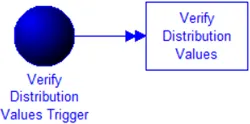
Where to Find the Model Object
Section titled “Where to Find the Model Object”The following model object can be found in the model objects directory:
- Misc - Verify Distribution Values
Difficulty Level
Section titled “Difficulty Level”- Ease of Use: Easy
- Ease of Modification: Easy
How to Use the Model Object
Section titled “How to Use the Model Object”- Open the Model Object: Locate the model object, Verify Distribution, and select the open button.
- Define Values: Go to the action logic tab of Verify Distribution Values, and replace the triangular distribution(T(1,10,15)) with the distribution you want to test.
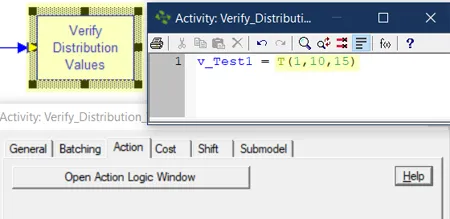
-
Steps to Verify Distribution Values
-
**Simulate **the model: It will run for 40 hrs sending over 140,000 entities through your distribution.
-
At the end of the simulation, click **Yes **to the prompt ‘Do you want to see the results?
-
**Click **the **Variables **tab to review the variable statistics like; minimum, maximum and average values for the variable v_Test1.
-
**Click **the **Variable **icon in **Export **section of the ribbon menu to export variable data to Excel, choose the location where you wish to save the file, and click Save.
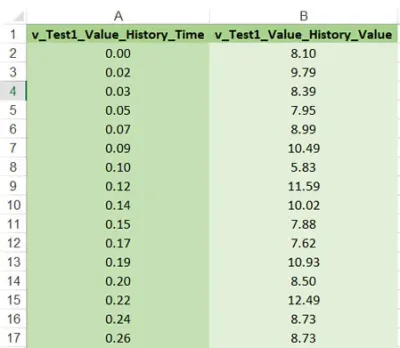
If you use the distribution for a time value, ensure it does not return negative or extreme values! Suppose you see that the distribution returns negative values. In that case, you will either need to select another distribution or create action logic to bypass the negative values returned by the distribution. For example:
YV9BdHRyaWIgPSBOKDMsMSkKSWYgYV9BdHRyaWIgPCAwIFRoZW4ge1RpbWUgMCBNaW59CkVsc2Uge1RpbWUgYV9BdHRyaWIgTWlufQ==
If you are encountering extreme values in your distribution, open the model object Remove Distribution Extreme Values.
Controls Usage
Section titled “Controls Usage”Variables:
Section titled “Variables:”- v_Test1: User input required. The return value of your distribution.