

Entities
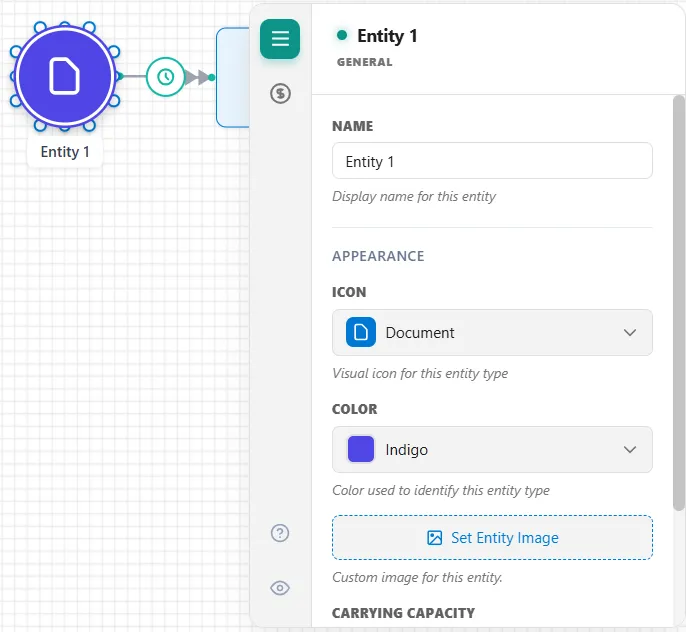
An entity is a unit of work that flows through your model: a customer, an order, a part, a patient, whatever your process handles. You create one by dropping an Entity shape on the canvas. It becomes the start of the flow, and an arrival connection from it sets how and when entities enter (see Arrivals).
Name and appearance
Section titled “Name and appearance”On the entity’s General tab you set:
- Name: the display name for this entity type. You can also rename it by double-clicking the shape.
- Appearance: an Icon from the built-in set, a Color, or your own image, so each entity type is easy to tell apart on the canvas and in the animation.
Carrying capacity
Section titled “Carrying capacity”An entity that carries others, such as a bus, a pallet, a tray or a truck, can be given a limit. Carrying Capacity, on the same General tab, is the most children an entity of this type can hold through an attach route: “Maximum children this entity can hold via Attach. 0 = unlimited.” The box reads “0 (unlimited)” until you set it, and an attach route set to ALL takes no more than this number. In action logic, Entity.Capacity sets it for one entity (see Entity Properties).
Entity cost
Section titled “Entity cost”The entity’s Cost tab sets how it accrues cost during a run:
- Initial Cost: a cost added to the entity the moment it is created.
- Waiting Cost: a cost per hour that accrues while the entity is waiting: in a queue, waiting for a resource, batching, or in transit.
As the entity moves, ProcessModel adds these to the activity, route, queue, and resource costs it picks up along the way to build its running total: how cost adds up covers all five places it is set. In action logic you read that running total with Entity.TotalCost, and after the run the Cost report tab shows it per entity type.
LegacyHow this worked in the previous version
Entities
Section titled “Entities”Entities are the items or people processed during the simulation-e.g., products, documents, customers, etc. Selecting an entity shape from the shape palette, then placing it on the layout defines an entity. Next, change the name by selecting the graphic and typing.
Entities show as moving graphics during the process simulation and move on routings from activity to activity. In addition, ProcessModel provides hundreds of predefined entity icons from all major industries. Import additional icons as needed. Using meaningful graphics to represent entities in your model will allow others to visualize the process accurately.
Use any ProcessModel graphic as an entity (activity, resource, storage, link, label). To use a non-entity graphic as an entity, double-click on the graphic and change the object type to Entity.
General
Section titled “General”**Name **The name of the entity (e.g. Customer, Product_A, etc.). The entity name is used primarily for decision making and reporting purposes. It is simply a descriptive attribute that may be changed during the simulation and tested for making process decisions. Entity statistics are reported based on the final name of the entity.
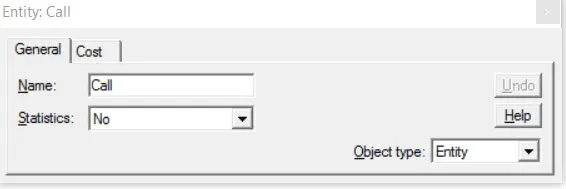
Statistics: Yes / No This selection determines whether statistical information will be collected, displayed in the scoreboard, and reported in the Output Module for this entity.
**Object Type **Allows the type of object to be changed from Entity to something else.
- What is entity cost?
- How can change the graphic for an entity?
- How can I change the entity name?
- How can I import graphics into ProcessModel?
The entity element
Section titled “The entity element”Entities are the items or people being processed-e.g., products, documents, customers, etc. An entity is defined by selecting an entity shape from the shape palette, placing it on the layout, and entering any applicable information for that object in the properties dialog.
Entities are represented by graphics you choose from the palette. They will be shown as moving graphics during the process simulation. Using meaningful graphics in the model to represent entities in your real system will allow others to accurately visualize the flow through the process. They are processed at activities and are moved on routings from activity to activity. Entities can have an initial cost and collect additional costs from processing at activities, movement on routings and from the use of resources. There are hundreds of predefined entities in ProcessModel from all major industries.
Any ProcessModel graphic can be used as an entity (activity, resource, storage, link, label). To use a non entity graphic as an entity, double-click on the graphic and change the object type to Entity.
Each pre-defined entity graphic is assigned a number by ProcessModel. These numbers are used only for the NewGraphic statement (see NEWGRAPHIC).
ProcessModel contains several predefined entity shapes. Each predefined entity shape has the word ‘entity’ placed in parentheses in the shape name. However, you may also define custom entity shapes.
General
Section titled “General”
Name: The name of the entity (e.g. Customer, Product_A, etc.). The entity name is used primarily for decision making and reporting purposes. It is simply a descriptive attribute that may be changed during the simulation and tested for making process decisions. Entity statistics are reported based on the final name of the entity.
When you add an additional text label to an entity, place the label on the center of the entity. Otherwise, the entity will appear smaller during simulation.
Statistics: Yes / No This selection determines whether statistical information will be collected, displayed in the scoreboard, and reported in the Output Module for this entity.
The maximum number of entities that can be displayed in the simulation scoreboard is 12. That number cannot be modified.
Object Type: Allows the type of object to be changed from Entity to something else.
Related to Entity
Section titled “Related to Entity”- What is Entity Cost?
- How do I change Activity Time based on Entity Attribute?
- How do I Change Activity Time Based on Recurring Entity Passes?
- How do I Divide an Entity?
- How do I Randomly Assign Entity Attribute Values?
- How do I Renege an Entity?
- How do I Tracking Entity Conditions?
- How do I Change Entity Graphics During Simulation?
- How do I Import Entity Graphics?
- Why am I Getting Entity Arrival Failures at the End of Simulation?
- Why am I Getting Entity Exits System Before Releasing all Captured Resources?
Entity cost
Section titled “Entity cost”The identification of cost is optional and has no effect on the behavior of the model.
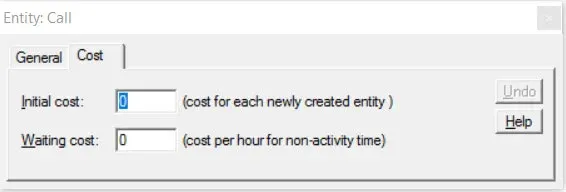
Initial cost The initial value assigned as the cost of each newly created entity (negative 1,000,000 to 1,000,000). Once assigned, the entity cost may be increased automatically during the simulation based on waiting time, activity time, and resource usage. This cost is added to the pre-defined Cost attribute of the entity.
Waiting cost The cost that is added to the entity per hour of waiting time. Cost may range from negative 1,000,000 to 1,000,000. This cost is added to the pre-defined Cost attribute of the entity.
- To learn more about costs, see “ProcessModel and Activity-based Costing”.
Related to Entity
Section titled “Related to Entity”- What is an Entity?
- How do I change Activity Time based on Entity Attribute?
- How do I Change Activity Time Based on Recurring Entity Passes?
- How do I Divide an Entity?
- How do I Randomly Assign Entity Attribute Values?
- How do I Renege an Entity?
- How do I Tracking Entity Conditions?
- How do I Change Entity Graphics During Simulation?
- How do I Import Entity Graphics?
- Why am I Getting Entity Arrival Failures at the End of Simulation?
- Why am I Getting Entity Exits System Before Releasing all Captured Resources?