

Equipment Types
An equipment type is a named bundle of settings that a group of elements inherit. When twelve fillers are the same model, you write down what that model does once, in a type, and each filler points at the type by name instead of repeating the values.
Opening the window
Section titled “Opening the window”The Definitions card has an Equipment Types line, with the number of types the model holds and an Open button. The card hides the line under the Software and Emergency Department views unless the model already holds a type. See Materials and the Definitions panel.
The window is titled Equipment Types. Like the other Definitions windows, it has no OK and no Cancel: every change is already in the model, Ctrl+Z takes it back, and the X or Esc closes it.
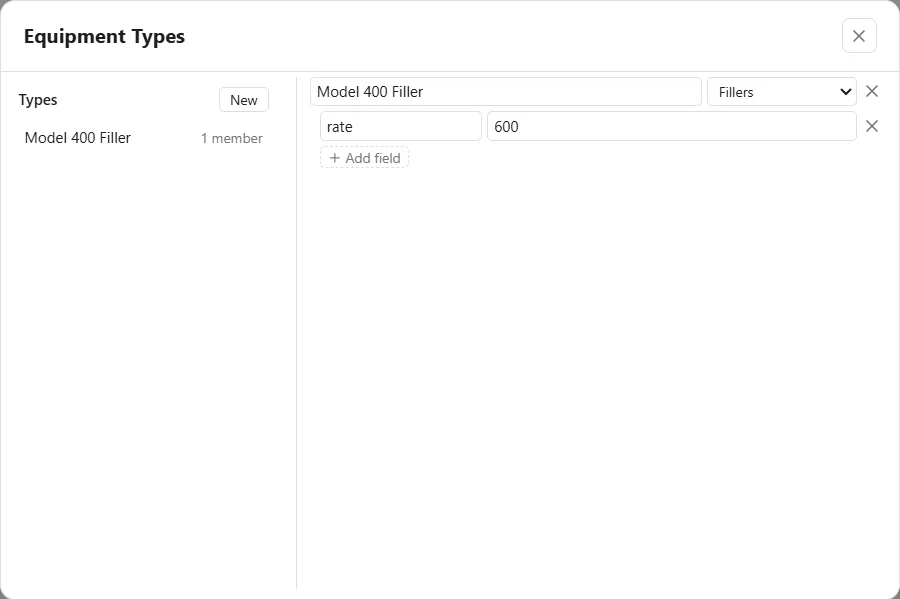
On the left, under Types, is the list of types with a New button. Each line shows the type’s name and how many elements use it, such as “1 member”, or “no members yet”. On the right are the type’s boxes, described next.
A type
Section titled “A type”Press New to add a type. Each type has:
- A name box. The name is what an element types into its Equipment Type box to join the type. The match is by name, so renaming a type here does not move the elements that already point at the old name.
- A family list, for the kind of element the type is for: Any element, Fillers, Unit Operations, Tanks, Dumpers, Discharges or Resources.
- Fields. Each field is a pair of boxes: the setting on the left and its value on the right. The left box names the setting, as its tip says, “by its key: rate, capacity, size”. Add field adds a pair, and the X beside a pair removes it. A setting left empty means the type says nothing about it.
The X at the end of the name row deletes the type.
Joining a type
Section titled “Joining a type”On the General tab of a Filler, a Unit Operation, a Tank, a Dumper or a Discharge, the Equipment Type box lists the types. A resource has the box too, once Moves along paths is ticked; it lists the Resources types and the standard kinds (see below). Type or choose a name, and the element is a member of that type and takes its values.
An element’s own values win. A setting the element fills in itself overrides the type’s value, and a setting it leaves empty falls through to the type.
An example
Section titled “An example”To make every Model 400 filler run at 600 a minute:
- In the Equipment Types window, press New and name the type Model 400 Filler.
- Set its family to Fillers.
- Press Add field, then write rate on the left and 600 on the right. For a filler, rate is the Fill Rate.
- On each filler, write Model 400 Filler in its Equipment Type box and leave its Fill Rate empty.
The type’s line now counts the fillers as members. Change the 600 in the type, and all of them follow.
Resources types
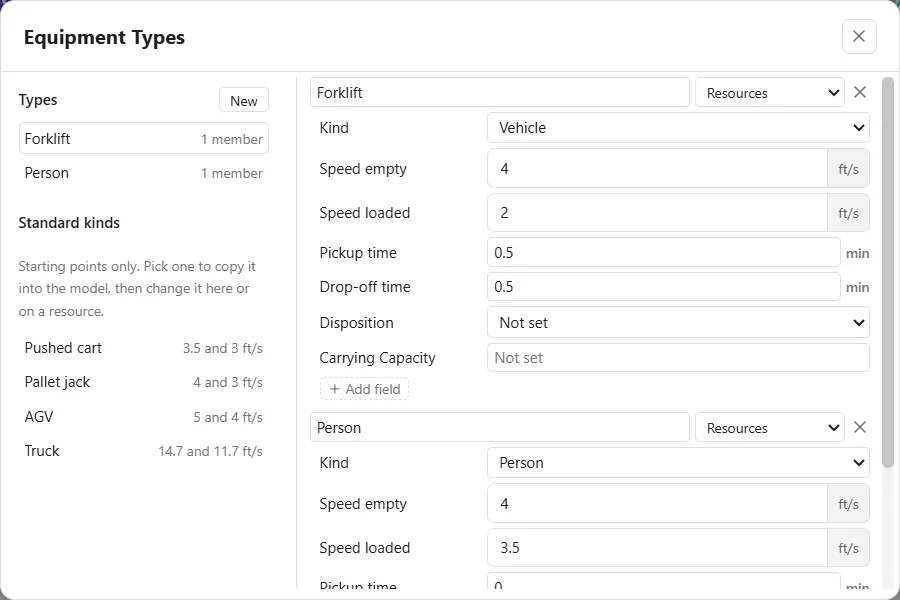
Section titled “Resources types”A type in the Resources family holds what a resource that moves along paths needs, with the same words as the resource’s Movement and Carrying tabs: Kind (Person or Vehicle), Speed empty, Speed loaded, Pickup time, Drop-off time, Disposition and Carrying Capacity. The seven appear as boxes of their own, above Add field. Speeds are in the model’s distance unit per second.
Under the list of types, Standard kinds offers the kinds the model does not hold yet, Person, Pushed cart, Pallet jack, Forklift, AGV and Truck, each with its empty and loaded speeds: “Starting points only. Pick one to copy it into the model, then change it here or on a resource.” Choosing a standard kind in a resource’s Equipment Type box copies it in the same way.
A field the resource leaves empty follows its type, and the resource says so in grey, for example “From Forklift”. A resource picked from the list keeps its type when the type is renamed. A type in the Any element family applies to resources too.
See also Filler, Tanks and vessels, Discharge and Dumper and Run Tables.