

How do I use an Attribute as Time?
This article is from the previous version of ProcessModel and is kept for reference.
LegacyHow this worked in the previous version
In situations where an activity time varies based on the type of entity it is processing, an attribute can be used to define the time value for the activity.
Suggested Technique
Section titled “Suggested Technique”- Define an attribute called a_Loc1_Time.
- Based on your entity arrival, assign time to each entity coming into the model using the attribute.
- Use the attribute in the time feild of the location attribute.
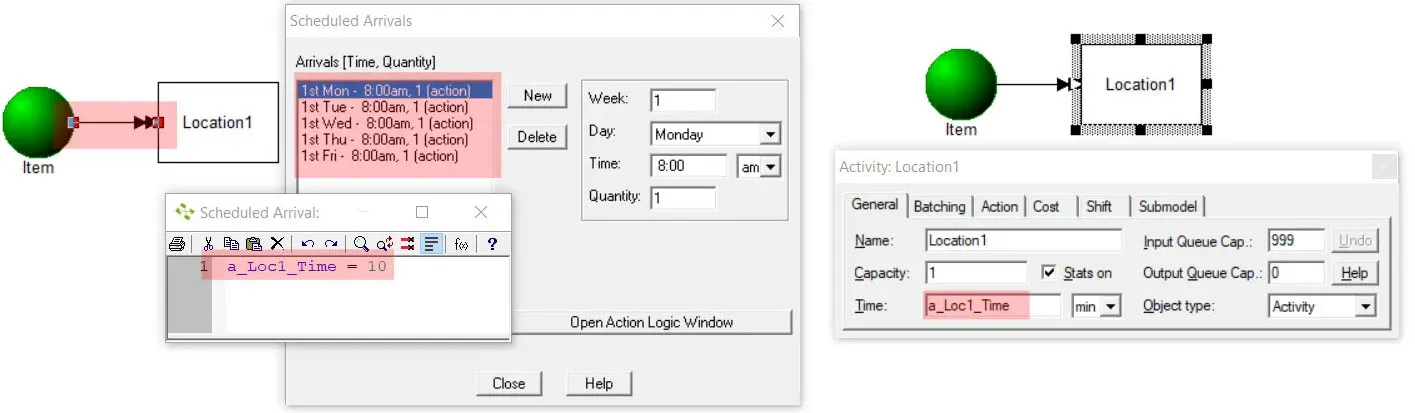
Defining time values using an attribute via scheduled arrivals / Using attribute for time value in the activity time field
TO DO: Define an attribute, update the attribute value via entity arrival or anywhere within the model (before the activity where time needs to be spent). Use the attribute as time value on the activity, as shown in the above picture.