

Gate Conditions
A gate’s Conditions tab opens and closes it from what is happening in the model, rather than from a clock. Two expressions, each evaluated as the run proceeds.
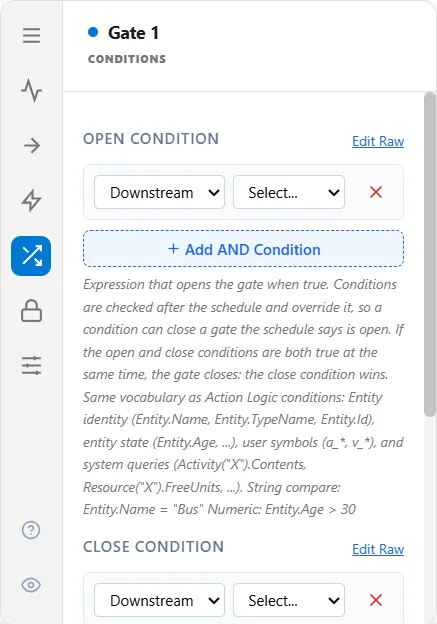
Open Condition and Close Condition
Section titled “Open Condition and Close Condition”- Open Condition: the gate opens when this becomes true.
- Close Condition: the gate closes when this becomes true.
You can set either or both. Conditions override the schedule, and if both are true at the same moment, the gate closes. Build them with the picker, or select Edit Raw to type an expression directly.
What you can put in a condition
Section titled “What you can put in a condition”The same vocabulary as an action logic condition:
| Kind | Examples |
|---|---|
| Entity identity | Entity.Name, Entity.TypeName, Entity.Id |
| Entity state | Entity.Age |
| Your own symbols | attributes such as a_Priority, variables such as v_Ready |
| Model queries | Activity("Pack").Contents, Resource("Loader").FreeUnits, Gate("Dock").QueueLength |
A gate’s condition may read the queue length of a gate, as Gate("Dock").QueueLength does: the picker’s Downstream group offers it.
Compare text with double quotes and numbers bare:
Entity.Name = "Bus"Entity.Age > 30This is also how a gate reacts to a signal: an open condition such as Signal("Go").Active opens the gate the moment that signal is sent.
A gate that opens on volume
Section titled “A gate that opens on volume”A gate may read its own queue length. A pickup gate that opens once three totes are waiting at it, and closes when fewer than three are:
Open Condition: Gate("Weld Pickup").QueueLength >= 3Close Condition: Gate("Weld Pickup").QueueLength < 3The condition is checked again each time the line at the gate changes. Gate("X").QueueLength reads 0 for a name the model has no gate for, and it works in action logic too (see Gate, Signal, and Inventory Queries).
A gate with no way to open
Section titled “A gate with no way to open”Worth checking before a run: a gate whose Default State is Normally Closed, with no schedule and no open condition, never opens. Nothing is scheduled to change its state, and entities pile up in its waiting queue for the whole run. The only escape is an OpenGate or ToggleGate call from logic.
If a run finishes with everything stacked behind one gate, this is the first thing to look at.
Conditions and logic do not mix well
Section titled “Conditions and logic do not mix well”An OpenGate or ToggleGate call anywhere in the model puts that gate under logic control for the rest of the run, and the conditions on this tab stop governing it from that moment. See Gate Events. Choose one approach per gate.
Under Pull or Kanban
Section titled “Under Pull or Kanban”A gate running as Pull or as a Kanban control is governed by downstream demand, so it cannot also carry conditions. On those gates the conditions stay visible but dimmed, with the reason on hover and a Clear button where a value is stored, and switching Pull or Kanban on clears any stored conditions. See Gate Blocking and Gate Flow Control.