

Engine Output
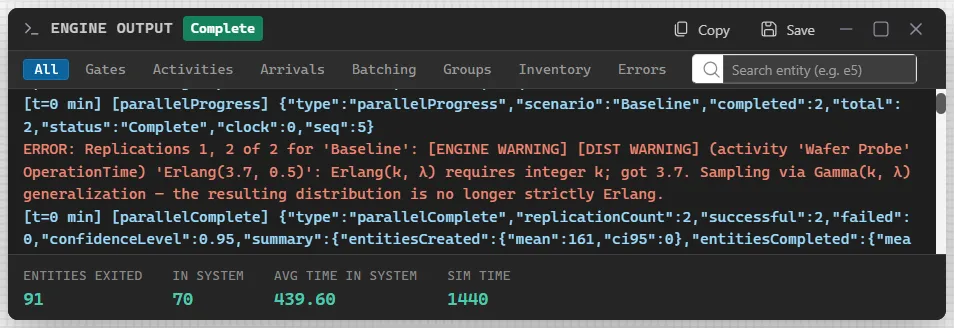
Engine Output is a live log of what the engine does while a model runs, one line for each event. Use it to follow one entity through the model, to see why a gate held work, or to read a warning in full.
Open it
Section titled “Open it”Press the log button at the right end of the simulation bar. Its tooltip reads Show Engine Output, and Hide Engine Output while the panel is open. The bar is there while a model runs, so the panel opens during a run. It floats over the canvas: drag its title bar to move it, and use the buttons at its right to maximize it or close it.
Closing the run, by answering the Simulation Complete question (see The Simulation Window), closes the panel and clears its lines. Copy or save what you need first.
What it shows
Section titled “What it shows”The title bar names the panel and its state: Running, with a count of events, while the run goes, then Complete, or Error if the run stopped on an error. Each line is one event, stamped with the simulation time, such as an entity arriving, an activity starting or a gate releasing work. When the run completes, a strip along the foot gives Entities Exited, In System, Avg Time in System and Sim Time.
Filters and search
Section titled “Filters and search”The buttons under the title bar narrow the log to one kind of line: All, Gates, Activities, Arrivals, Batching, Groups, Inventory and Errors. With Gates chosen, a summary above the log lists each gate with its state and its queue length, and the entity next in line.
Type an entity’s name in Search entity (for example e5) to see only the lines for that entity, from its arrival to its exit. When nothing matches, the panel says “No events match the current filter”.
Copy and Save
Section titled “Copy and Save”Copy puts the output on the clipboard, and Save writes it to a text file. Both stay gray until there is something to copy.
Warnings from replications and scenarios
Section titled “Warnings from replications and scenarios”When a model runs several replications or scenarios, a warning the engine raises is printed once for each different text, and the line names the replications that raised it: “Replications 1, 2 of 2 for ‘Baseline’:” followed by the warning. A warning raised in every replication therefore appears as one line, not one for each. In Figure 1 the line is red.
For the figures a run produces once it is over, open the Output Report.