

Process Tables
A Process Table is a reusable table of IF/THEN rules that you can drop into any action logic. Rather than writing the same block of conditions and actions at several activities, you build the rules once as a table and call it by name wherever you need it.
Open Process Tables from the Tools menu to manage them, or insert one while you are editing action logic.
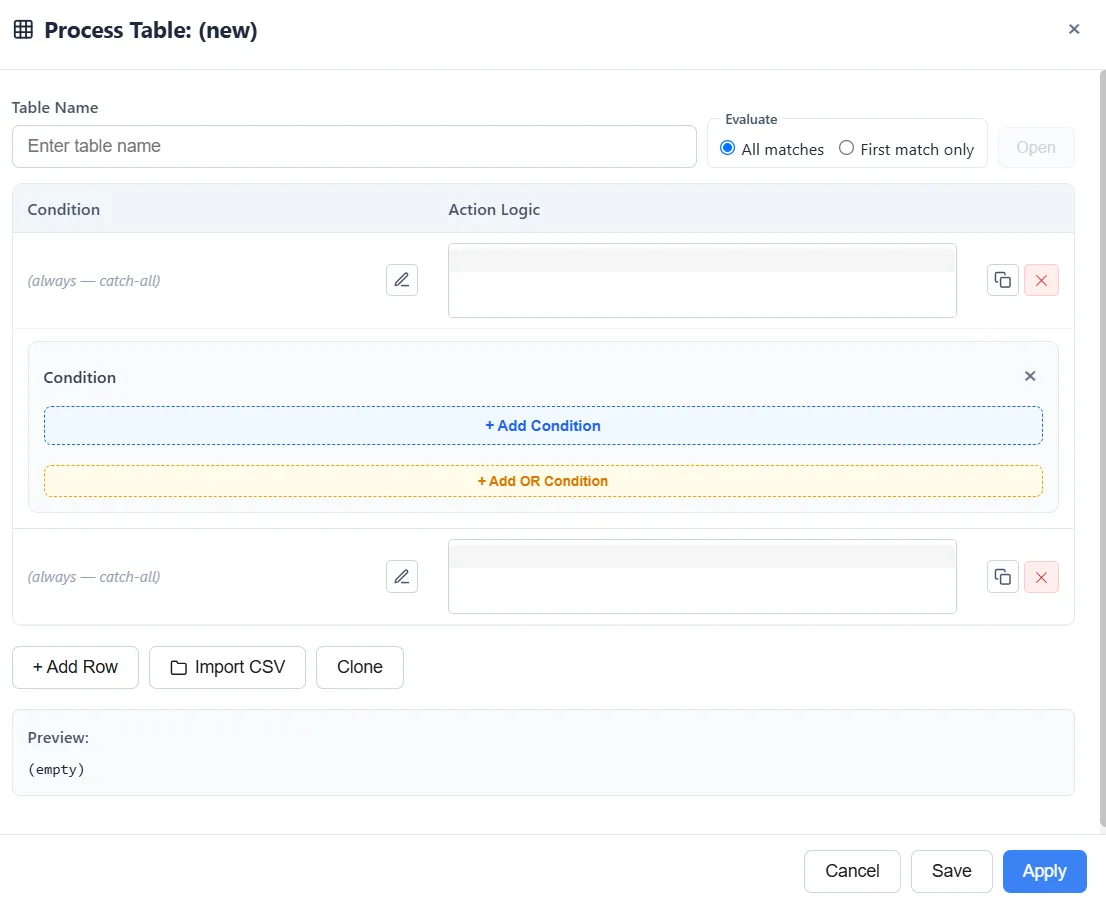
Building a table
Section titled “Building a table”Each row of a table is one rule with two parts:
- Condition: an expression that decides whether the row applies, for example
a_Type = "Rush". You build it with the same condition builder used for routing. A row with no condition always applies, so it acts as a catch-all. - Action Logic: what happens when the condition is true: set a variable, route the entity, seize a resource, and so on.
Add as many rows as you need, and choose how they are read:
- All matches runs every row whose condition is true.
- First match only stops at the first matching row, like a switch statement.
You can enter rows by hand or import them from a CSV file.
Using a table
Section titled “Using a table”Call a table from any action-logic field with ProcessTable("Name"). When an entity reaches that point, ProcessModel checks the table’s rows against it and runs the action logic of the ones that match. After a run, the Process Tables report shows how often each table was evaluated and how many times each row fired.