

Costs in a model
Cost in ProcessModel is authored in five places and read in one. Almost every charge lands on a single running total carried by the entity, and most of them are also sorted into a value classification, so the report can tell you not just what the process cost but how much of that cost bought something the customer wanted.
The five places you set cost
Section titled “The five places you set cost”| Where | What you set |
|---|---|
| Entity Cost | An Initial Cost stamped on each entity at creation, and a Waiting Cost per hour of waiting |
| Activity Cost | A Per-Entity Cost on completion and a Processing Cost per minute, each a number or an expression, and the activity’s VA / NVA / RNA classification |
| Resource Cost | An Hourly or Idle / Busy rate, a Cost Per Use, and an Overtime Multiplier |
| Queue Cost | A Cost Per Unit charged as each entity leaves the queue |
| Cost on a route | A Cost Per Move charged each time an entity travels the route, with its own classification |
An Inventory item’s Unit Cost is a sixth, smaller one: it charges the entity for the stock it takes.
How a charge is classified
Section titled “How a charge is classified”Alongside the running total, ProcessModel keeps three buckets: value-added, non-value-added, and required non-value-added. Which bucket a charge lands in is decided for you, and the rule is not the same everywhere:
| Charge | Bucket |
|---|---|
| Activity Processing Cost | The activity’s own classification |
| Resource hourly cost and cost per use | The classification of the activity that is holding the resource |
| Route Cost Per Move | The route’s own classification |
| Queue Cost Per Unit | Always non-value-added |
| Entity Waiting Cost | Always non-value-added |
| Activity Per-Entity Cost | Always value-added |
| Entity Initial Cost, inventory unit cost | No bucket, total only |
| Resource overtime, break and downtime cost | No bucket, reported against the resource |
| Resource idle cost | No bucket, shared over the entity types that used the resource when the run ends |
A resource that an entity holds across routes and waits (a Get with Keep) is charged slice by slice by what the entity is doing: the route’s classification while it moves, and non-value-added while it waits in an output queue.
Two consequences are worth knowing before you read a report.
The three buckets do not add up to the total. Initial Cost and inventory unit cost go straight to the total with no classification, so a model that stamps a large value on each entity will always show a total larger than the three buckets combined. Idle resource cost is a second reason: it is shared out over the entity types at the end of the run, so it counts in each type’s total but in none of the three buckets, where it reads as “Other” in Cost Mix. That is expected, not an error. Cost that moves between entities, when parts are joined to a carrier or split out of one, is counted once, in whichever entity holds it: see Cost follows the parts.
Setting an activity to NVA does not move its Per-Entity Cost. That charge is booked as value-added whatever the classification beside it says. If you need the classification to govern the charge, put the money on Processing Cost instead, which does follow it.
What the classification also does
Section titled “What the classification also does”The VA / NVA / RNA setting on an activity is not a label for the report. It selects the cost bucket above, it selects the matching time bucket, and it decides how any resource held at that activity is classified while it works. Changing it changes the numbers, so set it to describe the work honestly rather than to make a chart look better.
Where cost shows up
Section titled “Where cost shows up”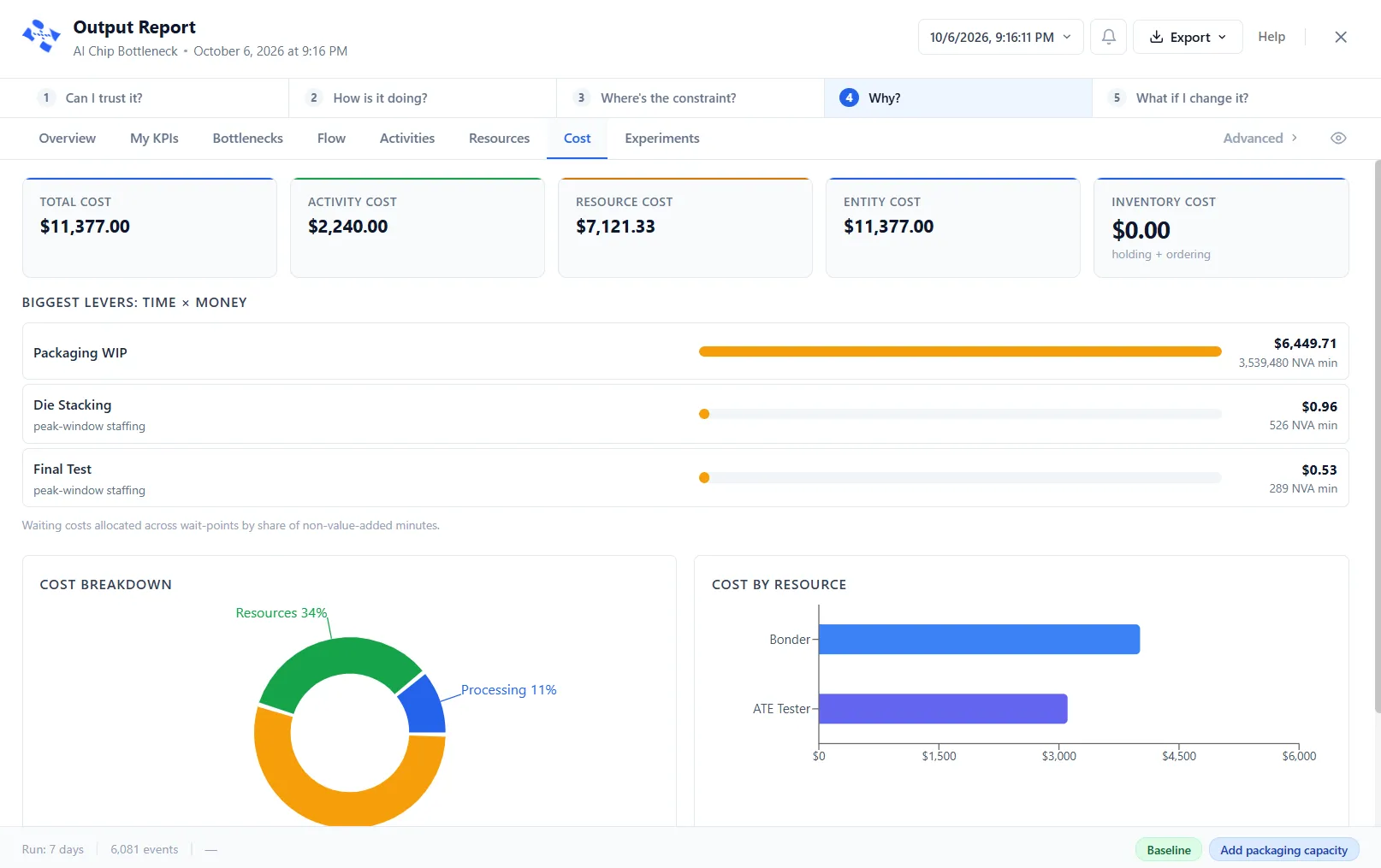
After a run, the Cost report tab rolls the whole thing up: cost per activity, cost per resource split into used, unused, break, downtime, and overtime, and cost per entity type. Impact Analysis uses the same buckets to rank where value is being lost. In action logic, Entity.TotalCost reads an entity’s running total at any moment.
Things that catch people out
Section titled “Things that catch people out”- Time in transit bills the waiting rate. An entity moving along a route accrues its Waiting Cost for the whole move, and that charge is non-value-added even when the route itself is marked value-added.
- Waiting Cost has deliberate gaps. An entity blocked at an activity’s output, or parked because capacity is full, does not accrue it. Only genuine waiting is charged.
- Overtime needs a shift. The Overtime Multiplier only ever applies to a resource that has a shift schedule, because overtime is measured against that schedule. A resource with no shift can never work overtime, so the multiplier never comes into play.
- Most cost fields cannot go below zero. Only Initial Cost, the resource rates and Cost Per Use keep a negative amount. Per-Entity Cost, Processing Cost, Cost Per Move, Cost Per Unit and Waiting Cost charge nothing at zero or below, and an activity cost expression that works out below zero stops the run with “A cost must be a number of zero or more.” The Cost report tab leaves out rows whose cost totals zero or less, and reads “No Cost Data” unless the grand total or a route cost is above zero.