

Assigning Resources
To make an activity use a resource, connect the resource to the activity. When an entity reaches the activity, it seizes the resource, does the work, and releases it.
Connecting resources
Section titled “Connecting resources”- Draw a resource connection from the resource to the activity. The connection type (Get / Free, Get / Keep, and so on) sets when the resource is taken and released.
- An activity can use several resources at once by connecting more than one. The entity waits until all of them are available.
- Set the activity’s capacity to match how many entities the resource pool can serve in parallel.
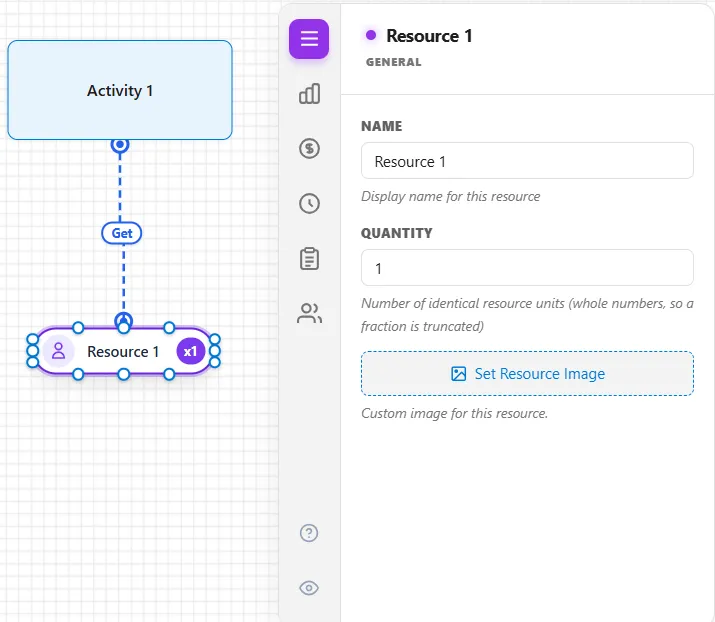
For which unit is chosen when several are free, and how competing activities are ordered, see Resource Priority.
LegacyHow this worked in the previous version
Resource assignments define the use of one or more resources in performing an activity or moving an entity. For each entity that is processed or moved, each assigned resource is captured and held until it is freed via the resource connection or a FREE statement in Action logic. While the resource is captured, it is not available for use by other activities or routing connections. To be pulled away from a task the resource is performing, it must be interrupted by a resource assignment that has the Respond immediately box checked.
Resources may be captured for performing an activity or a move. They may also be freed or kept after the activity or move is completed. Multiple or alternative resources may be used for an activity or move.
A connected resource is always captured BEFORE any defined activity or move time and freed AFTER an activity or move time. If an input queue is defined for an activity, the connected resource is captured prior to the entity entering the activity. If no input queue is defined, the entity enters the activity and then captures the resource. Multiple resources required for an activity or routing are not captured until they are all available. To capture multiple resources as each becomes available, use a GET statement in the Action logic of the activity or routing.
Assignment Types
Section titled “Assignment Types”Following is an explanation of each type of resource assignment and the information in its properties dialog.
Using Multiple Resources
Section titled “Using Multiple Resources”You may use multiple resources and mix the resource connection types. You can mix multiple and alternate resources. When defining multiple resource connections, remember that they are executed in the order in which they were defined. To change that order, disconnect the resource connections and reattach them in the order you desire.
Using a resource at an activity
Section titled “Using a resource at an activity”A resource (employee, machine, etc.) is used at an activity to perform the activity.
Suggested Technique
Section titled “Suggested Technique”- Create the activity where the resource will be used.
- Create the resource. (Be sure that the Object Type field in the properties dialog indicates Resource.)
- Connect the resource to the activity.
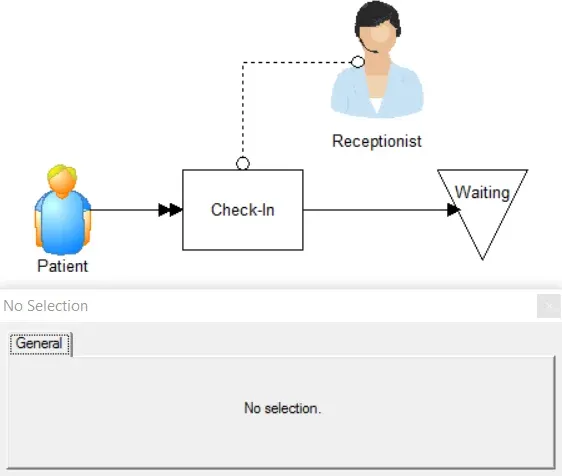
Alternatively, you may use the GET and FREE statements in the Action logic of the activity. Connected resources will always be captured before resources specified in a GET statement. On the other hand, resource connections that free a resource occur after any Action logic for the activity.
TO DO: Create the resource and connect it to the activity as shown above.
Multiple resources on one activity
Section titled “Multiple resources on one activity”Using more than one resource (employee, machine, etc.) to perform an activity.
Suggested Technique
Section titled “Suggested Technique”- Connect the resources to the activity or routing.
- Make sure that each connection Type is either a Get or Get and Free.
Example: A dental treatment requires the use of a dentist and an assistant.
TO DO: Connect both resources to the activity.
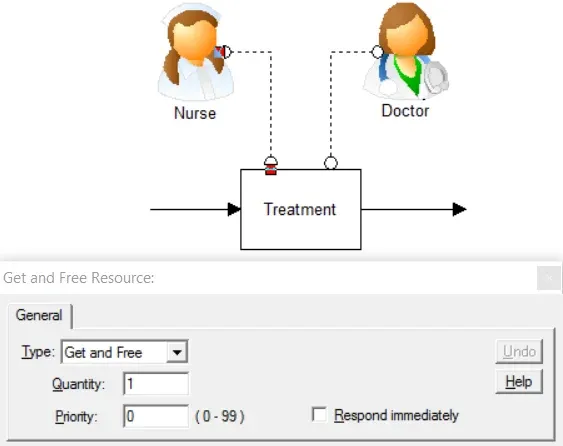
- Alternatively, you may use the GET or JOINTLYGET and FREE statements in the Action logic. Connected resources will always be captured before resources specified in a GET statement. On the other hand, resource connections that free a resource occur after any Action logic for the activity. If each resource is required for different lengths of time, use Get connections and specify the times followed by FREE statements in the activity Action logic. For example:
VElNRSgzLjUgbWluKQpGUkVFIERvY3RvcgpUSU1FKDUgbWluKSAvLyBOdXJzZSB1c2VkIGZvciA1IGFkZGl0aW9uYWwgbWludXRlcwpGUkVFIE51cnNl