

Batch Smaller Quantity at a Specific Time
LegacyHow this worked in the previous version
When you need to complete a batch at a specific time of day, whether the normal batch size has been reached or not.
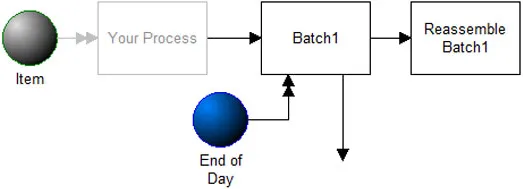
Where to Find the Model Object
Section titled “Where to Find the Model Object”The following model object can be found in the model objects directory:
- Batching - Smaller Quantity at a Specific Time.
How to Use the Model Object
Section titled “How to Use the Model Object”-
Open Your Model: Open your model or create a new blank model.
-
Insert the Model Object into Your Model
-
Locate the model object Smaller Quantity at a Specific Time and select the insert button.
-
Move the cursor to the point of insertion and left mouse-click. The upper left corner of the **model object **will be inserted at the location of the mouse-click.
-
Connect to Your Model
-
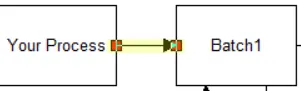
Connect the trailing end of the route entering **Batch1 **to an activity in **your **model.If you add any additional route entering Batch1, make sure they each contain a copy the action logic from the model object’s route.
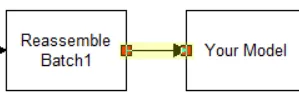
- Connect Reassemble Batch1 to an activity in **your **model.
- Define Values
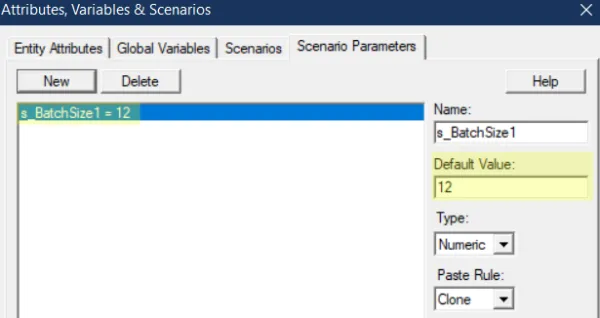
Change the **s_BatchSize1 **parameter to **your **standard batch size.
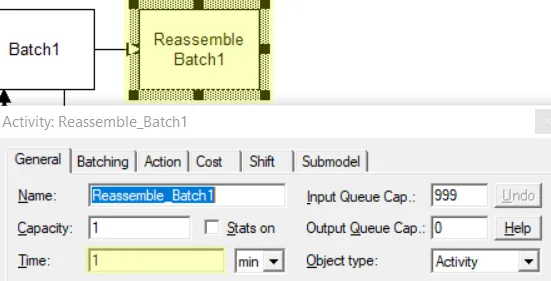
- Change the **Time **field on Reassemble **Batch1 **to the time it normally take to process a batch (not the time for each individual entity within the batch).
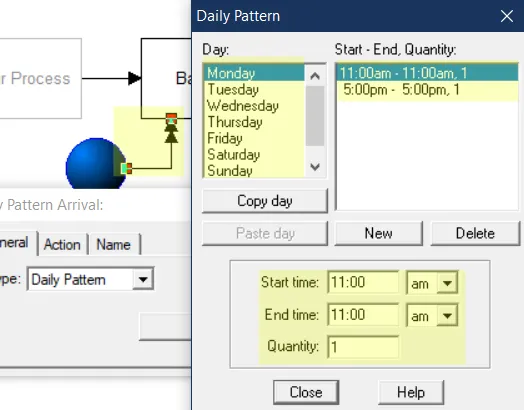
- Change the **arrival times **in the End of Day arrivals to indicate when **you **want the small batch to be completed.Do not change the name of the “End of Day” entity. That name is used within the model object.
- Completion: The model object is now integrated into your model, you should now be able to save and then simulate the model.
Controls Usage
Section titled “Controls Usage”Attributes:
Section titled “Attributes:”- a_BatchSize1: Size of the batch. Normally this is your standard batch size. But at the times when the End of Day entity arrives, it is set to 1 which closes the batch. Then, just prior to entering Reassemble Batch1, is reassigned a value equal to the number of entities to be rebatched.
- RebatchQty: A system attribute that tracks the previous batch size.
Variables:
Section titled “Variables:”- s_BatchSize1: Your standard batch size.