

Visits a year and sizing
Every tile you place is sized to one number: the visits your department sees in a year. You enter it in a box at the top of the Emergency Department face and can change it at any time.
Your ED: visits a year
Section titled “Your ED: visits a year”The box is headed Your ED: visits a year and starts at 25,000. A line under it follows the number and the arrival pattern. At 25,000 it reads “About 68 visits a day; the busiest hour about 5 patients.” The box is shown in Emergency department modeling.
Type a whole number and press Enter, or click out of the box. The box takes 1,000 to 400,000. Anything else is refused with the sentence “Enter annual visits between 1,000 and 400,000.” and nothing changes. Esc puts the number back.
A note under the box says where the number comes from. At the start it reads “Pack default”, and it goes once you enter a number yourself. When the arrivals on the canvas were drawn by hand, it reads “Read from your arrivals” instead, and the box cannot be edited.
Every tile is born sized
Section titled “Every tile is born sized”A tile you place arrives already sized to the number in the box. These are the starting sizes:
- Nurses: one for every 4 beds and chairs.
- Providers and APPs: from a staffing table.
- Beds and chairs: one for every 1,043 visits a year.
- Inpatient beds: one for every 200 visits a year.
Registrars, triage nurses, resus bays and the arrival pattern are sized to the number too. Every size is a starting point. Change any of them by hand, and an item you changed keeps your value when the visits change.
Change the visits later
Section titled “Change the visits later”Change the number when tiles are already on the canvas and a window offers to resize them. It asks “Resize to 40,000 visits? Nothing changes until you say yes. Items you edited keep your values.” The number is the one you typed; 40,000 is the one in the picture.
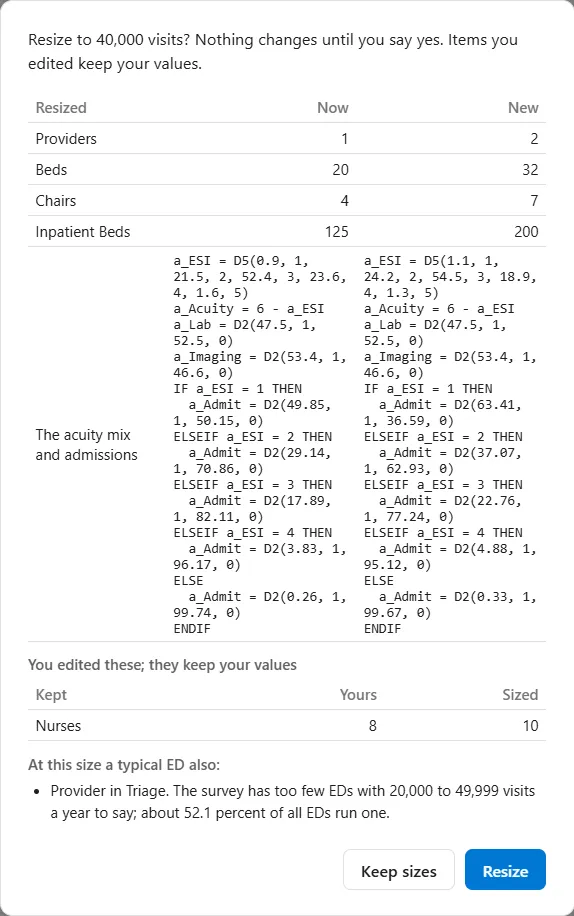
- Resized lists each item that would change, under the headings Now and New. In the picture Providers go from 1 to 2, Beds from 20 to 32, Chairs from 4 to 7 and Inpatient Beds from 125 to 200. The row The acuity mix and admissions shows the logic behind them, old beside new.
- You edited these; they keep your values lists what you changed by hand, under Kept, Yours and Sized. Yours is your value, and Sized is what the new number would have given. In the picture, Nurses are 8 and would have been 10.
- At this size a typical ED also: lists the care models the new size would ask about, here “Provider in Triage. The survey has too few EDs with 20,000 to 49,999 visits a year to say; about 52.1 percent of all EDs run one.” It only lists them. See Care models.
Resize applies the new sizes. Keep sizes changes none of them, and so does Esc. Either way the new number stays in the box and the arrival pattern follows it, and the whole change is one Undo.