

Why am I Getting Entity Arrival Failures at the End of Simulation?
This article is from the previous version of ProcessModel and is kept for reference.
LegacyHow this worked in the previous version
After the model has simulated the following prompt is displayed.
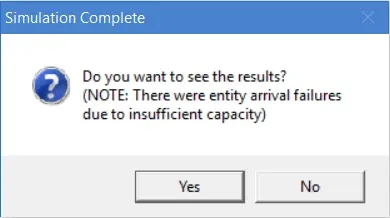
Simulation Complete, Do you want to see the results?
(NOTE: There were entity arrival failures due to insufficient capacity)
Reason
Section titled “Reason”Entity arrivals were scheduled to arrive. But because of limited capacity at the arrival location, they could not enter the model.
Solution
Section titled “Solution”Make sure you have a large enough capacity and/or input queue on the first activity following the arrival. Also make sure you haven’t assigned a shift to the activity that would cause the activity to be off shift when entities are scheduled to arrive.
Another way to avoid this message is to place a storage with sufficient capacity at the arrival location to act as a collection queue.
Related to Entity
Section titled “Related to Entity”- What is an Entity?
- How do I change Activity Time based on Entity Attribute?
- How do I Change Activity Time Based on Recurring Entity Passes?
- How do I Divide an Entity?
- How do I Randomly Assign Entity Attribute Values?
- How do I Renege an Entity?
- How do I Tracking Entity Conditions?
- How do I Change Entity Graphics During Simulation?
- How do I Import Entity Graphics?
- Why am I Getting Entity Arrival Failures at the End of Simulation?
- Why am I Getting Entity Exits System Before Releasing all Captured Resources?