

How do I Renege an Entity?
This article is from the previous version of ProcessModel and is kept for reference.
LegacyHow this worked in the previous version
A customer waiting for service decides to leave rather than continue waiting.
Suggested Technique
Section titled “Suggested Technique”- Route the customer to the desired activity.
- Make sure this activity has sufficient Input queue capacity to hold waiting customers.
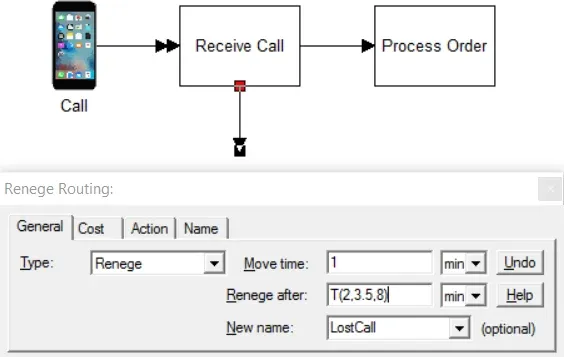
- Create a Renege routing from that activity to another storage or activity, or leave it unconnected so the customer will leave the system entirely.
- Set the Renege after time for the amount of time the customer will wait before leaving. (This is usually a distribution to indicate variability of a customer’s patience.)
Example: Callers on hold at the order desk will hang up if they have to wait too long. Some may wait as many as 8 minutes, other as few as 2 minutes, but most will wait around 3½ minutes. We want to rename the calls that hang up (renege) in order to keep separate statistics on those calls.
TO DO: Create the renege routing and enter the triangular distribution, T(2, 3.5, 8), and the new name in the appropriate fields as shown above.
- To learn more about the Renege routing, see Renege.
Related to Entity
Section titled “Related to Entity”- What is an Entity?
- What is Entity Cost?
- How do I change Activity Time based on Entity Attribute?
- How do I Change Activity Time Based on Recurring Entity Passes?
- How do I Divide an Entity?
- How do I Randomly Assign Entity Attribute Values?
- How do I Renege an Entity?
- How do I Tracking Entity Conditions?
- How do I Change Entity Graphics During Simulation?
- Why am I Getting Entity Arrival Failures at the End of Simulation?
- Why am I Getting Entity Exits System Before Releasing all Captured Resources?