

How do I Create Triggers?
This article is from the previous version of ProcessModel and is kept for reference.
LegacyHow this worked in the previous version
Triggers are stand-alone sections of a model that do such things as monitor other locations in your model, change global variable values, reset counters, etc. They are typically a single entity entering a single activity, running independently of all other sections of the model. An example trigger is one used to monitor the day of the week.
Suggested Technique
Section titled “Suggested Technique”- Create a Periodic arrival which repeats every 24 hours and has a quantity of 1.
- Create a global variable to be controlled in the trigger, and it’s value to be checked elsewhere in the model.
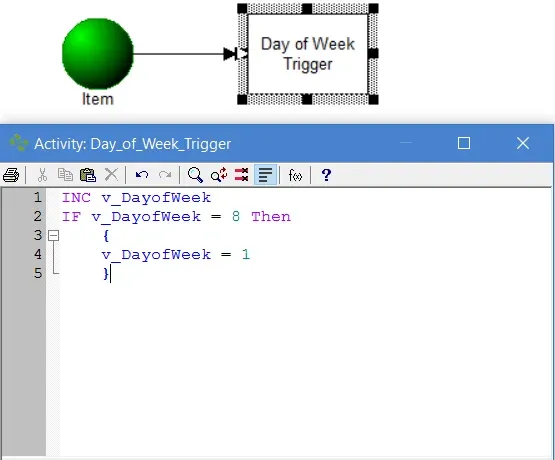
- Add action logic to the activity as shown below.
Example: An entity arrives every day which increments a counter representing the day of the week. An If … Then statement ensures the variable value is always between 1 and 7.
TO DO: Use the v_DayOfWeek global variable in other locations in the model in If … Then statements to cause certain actions to occur based on which day of the week it is.