

Checking your logic
ProcessModel checks every formula and every line of action logic against your model before a run, and again as the run goes. A problem is an error or a warning. Errors hold back Simulate and, in the Action Logic Editor, a save. Warnings do not.
Where a problem shows
Section titled “Where a problem shows”- In the Action Logic Editor. A mistake is underlined, with the reason on hover. The status bar counts the errors and warnings, and the footer reads “Fix 1 error before saving” while an error remains. See The Action Logic Editor.
- On a field in the Properties panel. A time, quantity or condition box with a problem wears a red mark. Rest the pointer on it to read the message.
- In the Issues panel, described next.
- When you choose Simulate. A model with errors does not run. A window headed “Cannot simulate” says how many errors must be fixed first and lists each as a row you can click to jump to it, with Cancel and Show Issues Panel below.
- During a run. A line that cannot work stops the run, and the message names it.
The Issues badge and panel
Section titled “The Issues badge and panel”When a check fails, a badge appears at the bottom right of the canvas. While the model is clean there is none. The badge is red with the number of errors, amber with the number of warnings when there are only warnings, and red with an amber mark when there are both. Click it to open the Issues panel above it.
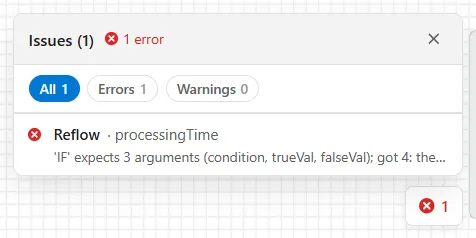
The heading counts the problems, Issues (N), with the errors and warnings counted beside it. The chips All, Errors and Warnings filter the list. Each row gives the name of the shape or route and the field the problem is in, then the message on one line. Rest the pointer on the message to read it whole.
Click a row and ProcessModel takes you there: it centers the canvas on the shape, selects it, opens the tab that holds the field and puts the cursor in the field. The X closes the panel.
What the checks say
Section titled “What the checks say”A call with the wrong number of arguments
Section titled “A call with the wrong number of arguments”Every function and distribution takes a set number of arguments. The message names the call, what it expects and which argument is the trouble:
'IF' expects 3 arguments (condition, trueVal, falseVal); got 4: the 4th, `5`, is one too many.With too few arguments it says which is missing, such as “got 2: the 3rd is missing”. The same check covers every function and distribution. For Lognormal the message names its two numbers logMean and logSd:
'Lognormal' expects 2-3 arguments (logMean, logSd, seed); got 1: the 2nd is missing.An IF on a line by itself
Section titled “An IF on a line by itself”In action logic, IF ... THEN is a statement. An IF written as a formula, IF(a_X > 1, 2, 3), returns a value, so on a line by itself it does nothing. The editor and the run both say so:
An IF formula on its own does nothing: give its value to something, `v_Y = IF(...)`, or write IF ... THEN ... ENDIF (the line as written).A name on the left of ”=”
Section titled “A name on the left of ”=””A line with an = is an assignment only when its left side is a name: a variable, an attribute, Entity. and a name, or an array cell. Anything else stops the run with a message such as:
'v_A + 1 = v_B' is not a statement: the left of '=' must be a variable, an attribute, Entity.<name> or an array cell.A write to an Entity name that does not exist
Section titled “A write to an Entity name that does not exist”Writing to Entity. followed by a name that is neither an attribute of the model nor a property of Entity stops the run, so a typo cannot quietly make a new attribute:
'Colr' is not an attribute of this model or a property of Entity (Entity.Colr = 5).Several problems in one field
Section titled “Several problems in one field”A field with more than one wrong call lists each as its own row in the Issues panel, not only the first. The list stops at five wrong calls in a field, and one more row then says how many were left out, such as “+3 more issues suppressed”. Fix the ones shown and the others appear.
For the expressions themselves, see Expressions and Time Expression.