

Get the Same Resource Later
LegacyHow this worked in the previous version
When you want to get one of multiple resources in a preliminary process step, then get the same resource for work on the same entity at a later process step.
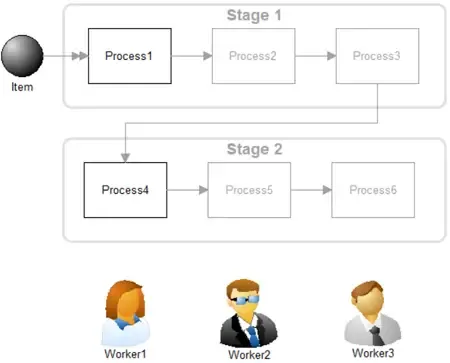
Where to Find the Model Object
Section titled “Where to Find the Model Object”The following model object can be found in the model objects directory:
- Utilization - Get the Same Resource Later
Difficulty Level
Section titled “Difficulty Level”- Ease of Use: Moderate
- Ease of Modification: Moderate
How to Use the Model Object
Section titled “How to Use the Model Object”-
Open your model: Open your model or create a new blank model.
-
Insert the Model Object into your model: Locate the model object Get the Same Resource Later and select the insert button.
-
Move the cursor to the point of insertion and left mouse-click. The upper left corner of the model object will be inserted at the location of the mouse-click.
-
Update objects:
-
**Copy **the action logic from **Process1 **and paste it into the activity where you would like to get the resource the first time.
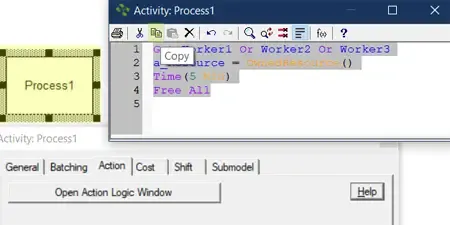
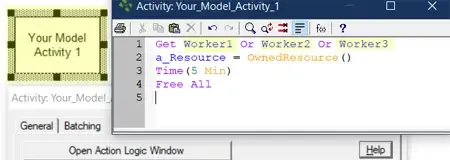
- **Replace **the **Worker **resource names with your own resource names.
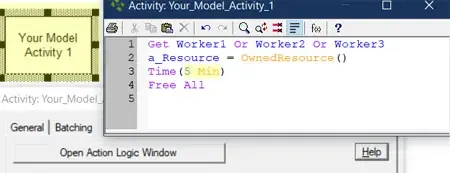
- **Alter **the Time statement in the action logic to match your needed time.
- **Copy **the action logic from **Process4 **and paste it into the activity where **you **would like to get the same resource the second time.
Note: Copy and paste the action logic from Process4 to any other activity where you want to get the same resource as was used in Step 1.
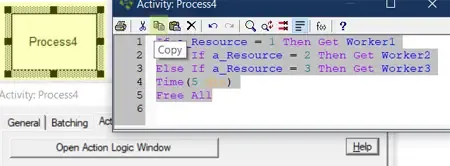
- **Replace **the **Worker **resource names with your own resource names.
Note: Once the resource is retrieved in the action logic of first activity and the a_Resource attribute assigned a value with OwnedResource(), the action logic used in Process4 ensures the same resource will be retrieved again for that particular entity.
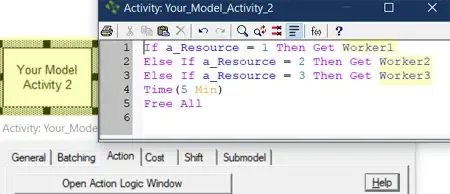
Note: The OwnedResource() function returns the resource number rather than the textual name. That number is determined by the order in which the resource graphic was placed in the model. For example, Worker2 was the second resource placed in the model. Therefore, regardless of the resource’s name, OwnedResource() returns a value of 2.
-
**Alter **the Time statement in the action logic to match your needed time.
-
Completion: The model object is now integrated into your model, you should now be able to save and then simulate the model.
Controls Usage
Section titled “Controls Usage”Attributes:
Section titled “Attributes:”- a_Resource: Do not change. The unique number associated to the resource retrieved by the GET statement in Process1.