

ProcessModel 7 Self Teach GuideChapter 15
Chapter 15. Build a Shop on Your Own, Then Take the Test
By the end of this chapter you can
Build a shop on your own, check it, and take the certification test.
Before you start
Fourteen chapters built one shop, a step at a time, with the steps written out for you. This last chapter takes the steps away. You get a brief, the way a real project starts, and you build the model on your own, run it, and answer three questions. Then you check your answer against a worked one, and take the certification test.
Do not skip ahead to the answer. The point of this chapter is the moment you get stuck and work it out: that is when what you learned becomes yours. Every part of the brief was taught in an earlier chapter, and each line says which, so you know where to look.
You need about an hour, and nothing else: you start from a Blank Canvas.
Step 1. Read the brief
The Screen and Battery Bar. The shop opens a second store that does two jobs only: new batteries and new screens. The numbers are made up for this course.
- Customers: 50 on Monday, in business hours, busiest at noon: 30 percent of them come between noon and 1. (Chapter 4)
- Check In: 2 to 5 minutes, mostly 3. No staff. (Chapters 2 and 3)
- The jobs: 6 in 10 need a New Battery: 5 to 15 minutes, mostly 8. The rest need a New Screen: 20 to 40 minutes, mostly 30. Each needs a Technician. (Chapters 3 and 5)
- One screen bench: New Screen works on one customer at a time. Screen customers wait in a Screen Queue that holds 3, and nowhere else. (Chapter 6)
- Staff: two Technicians, on all day, doing both jobs. (Chapter 2)
- Pick Up: 2 minutes. No staff. (Chapter 2)
- Run the whole Monday, ten times. (Chapters 4 and 10)
Then answer:
- How long is a customer in the store, on average?
- Where do they wait longest, and why?
- Try a second screen bench as a what-if. How much time does it save? (Chapters 11 and 12)
Step 2. Build it on your own
Start from Blank Canvas on the Welcome screen. There is no single right order, but this one works, and each part is something you have done before:
- The customer, then the five steps: Check In, New Battery, Screen Queue, New Screen and Pick Up, then the Technician with Quantity 2.
- The times, as distributions where the brief gives a range.
- The arrival as a Daily Pattern for Monday.
- The routes: two Percent routes out of Check In, and the routes on to Pick Up.
- The Technician’s lines to the two jobs.
- The two details that are easy to miss: the Screen Queue’s capacity, and New Screen’s own waiting room.
- The run length and the replications.
When you get stuck, go back to the chapter the brief names, find the step, and come back. That is not cheating: it is exactly how people who model for a living work.
Step 3. Run it and answer the three questions
- Run it, open the report, and check the banner before anything else (Chapter 11).
- Write down your three answers before you look at Step 4: the average time in the store, where customers wait longest and why, and how much a second screen bench saves.
For the what-if, build a scenario that changes one setting, as in Chapter 12. Which setting gives the shop a second screen bench is part of the exercise.
Step 4. Check your answer
Here is one good answer. Yours may look different: a different layout, other names or another look all count as right.
- Open the worked model, Screen and Battery Bar, from the practice models below.
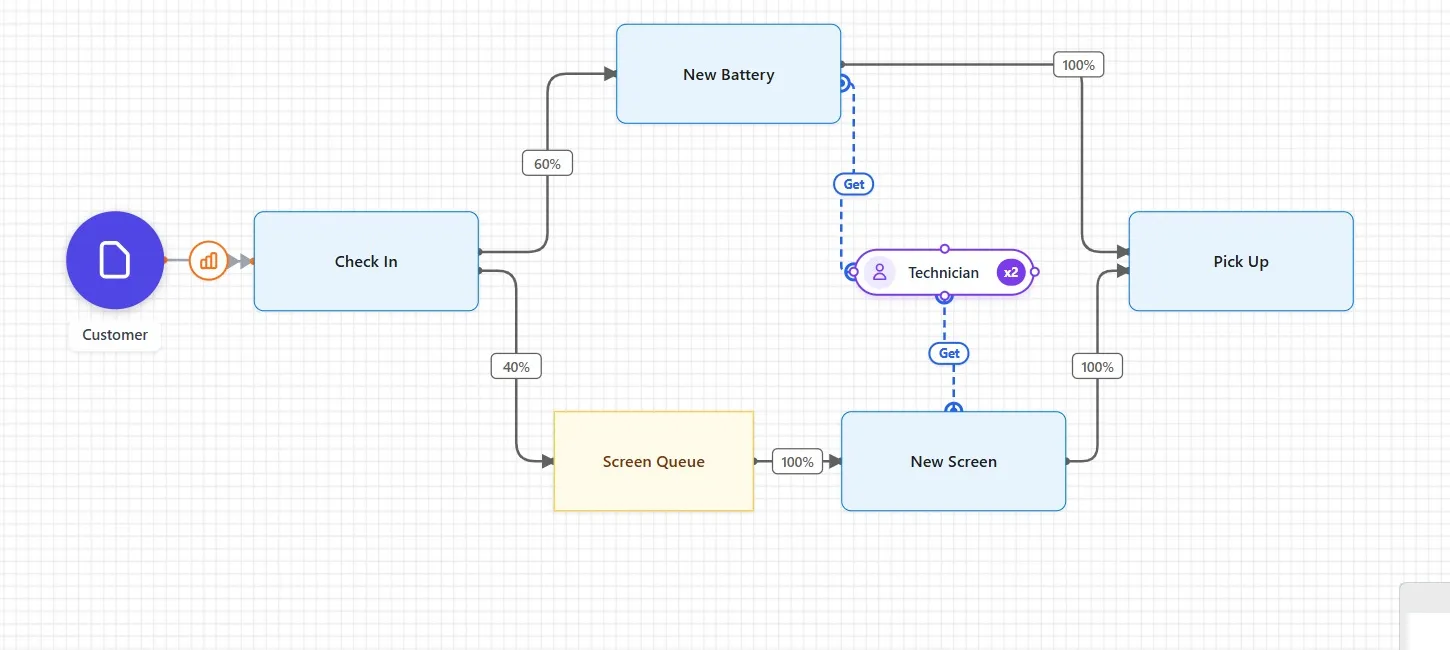
Check that yours has the same steps, routes and numbers. Customers arrive on a daily pattern at Check In, which sends 60 percent to New Battery and 40 percent to the Screen Queue. Screen customers wait in the queue for New Screen. Both jobs lead to Pick Up, and the two Technicians do both jobs.
- Run it, and open the report.
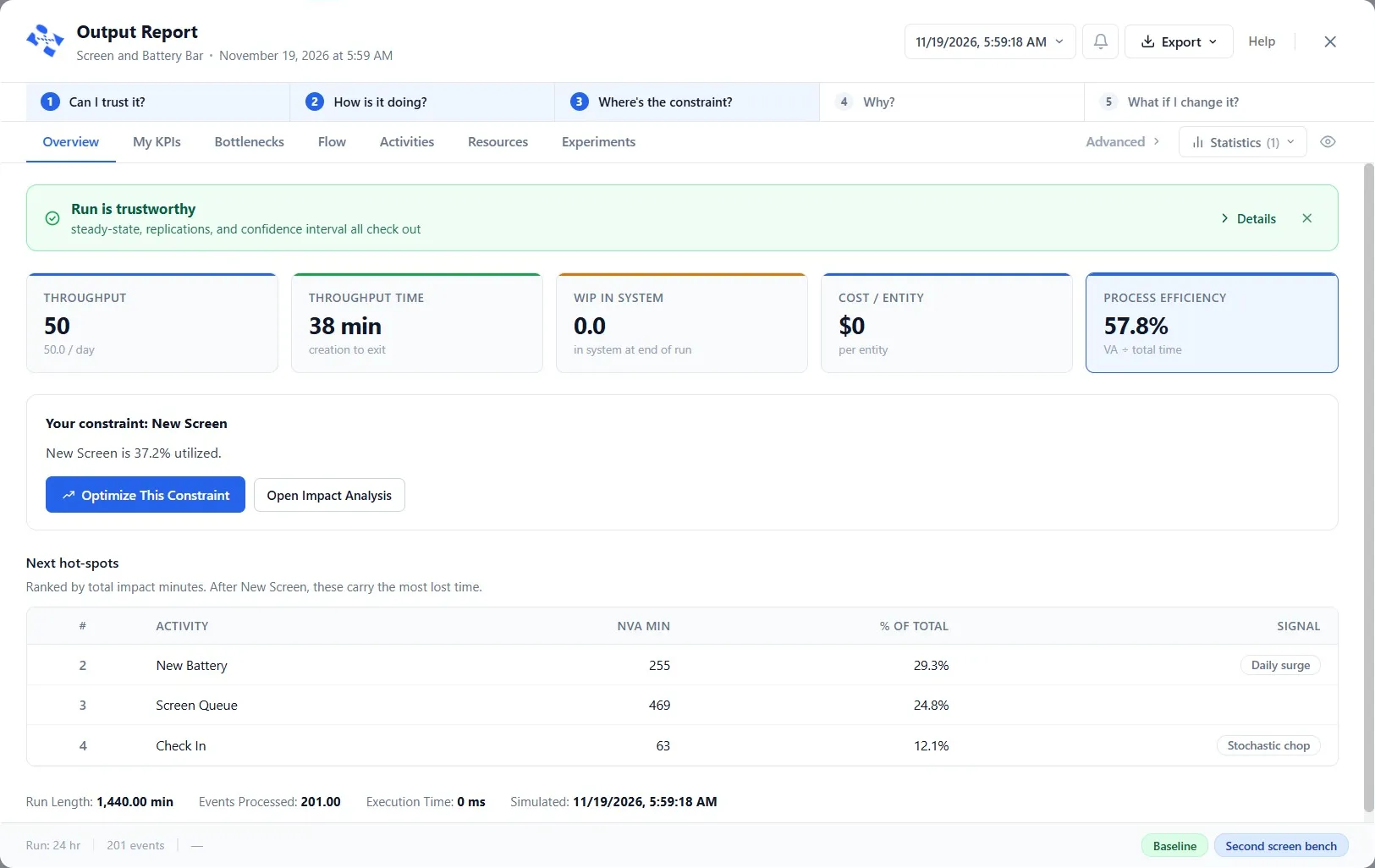
How long is a customer in the store? In the worked model, 38 minutes. Throughput is 50 and WIP is 0: every customer is served. Each model draws its own random numbers, so anywhere from about 38 to 43 minutes is right.
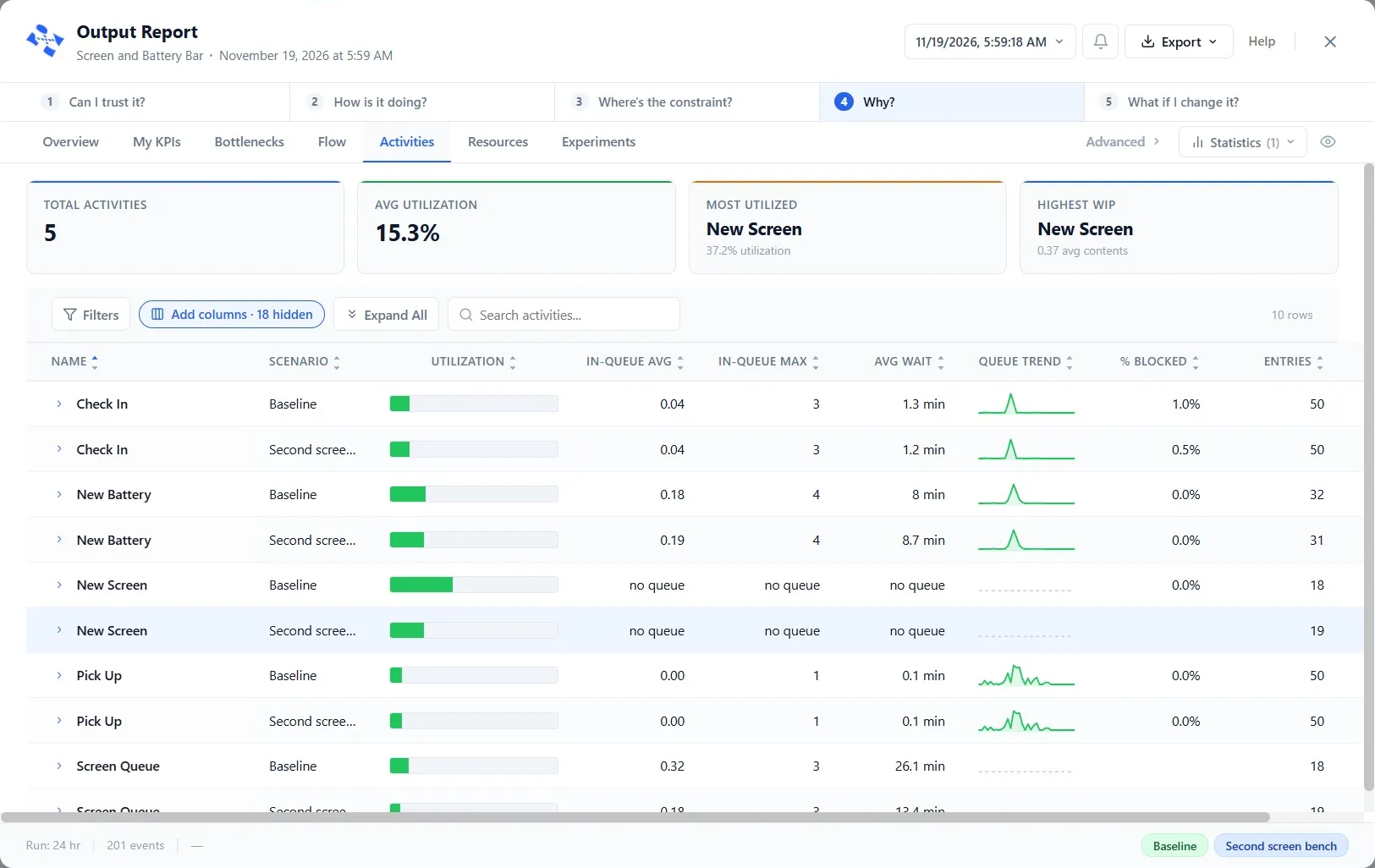
Where do they wait longest, and why? At the Screen Queue, about 26 minutes, for New Screen, the constraint. There is one screen bench, and a screen takes 20 to 40 minutes, so screen customers queue for it. The limit is the bench, not the number of people, just as it was the parts, not the people, in Chapter 11.
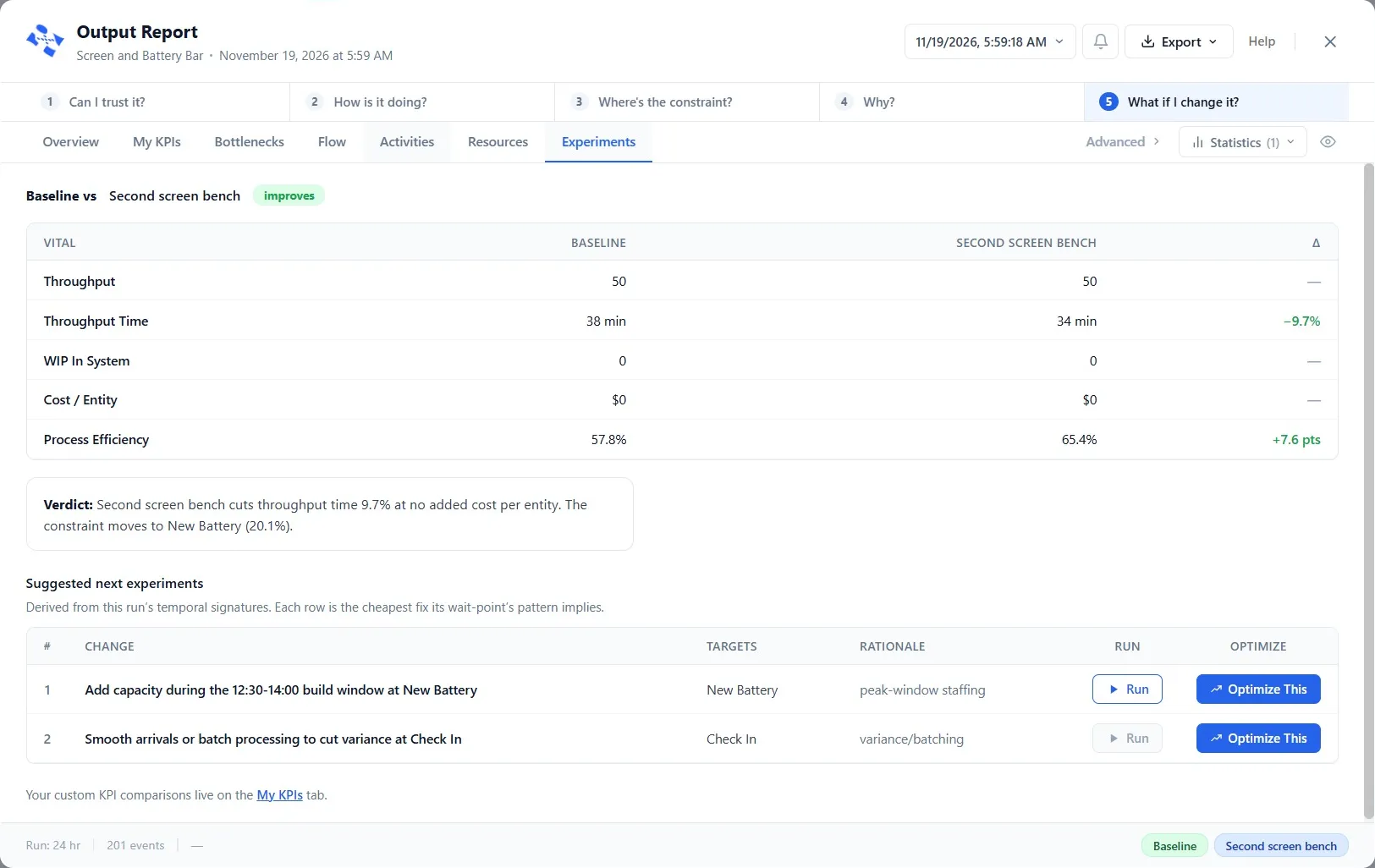
How much does a second screen bench save? In the worked model the scenario sets New Screen’s Capacity to 2, and the time in the store falls from 38 to 34 minutes, about 10 percent. Across different random numbers, a cut of about 9 to 15 percent is right. Notice the verdict’s last words: the constraint moves to New Battery. Fix one bottleneck and the next one shows itself. That is how improvement really goes, one constraint at a time.
If your model lands near these numbers, you built it right.
Go further
Three extras, unchecked, for when you want more. Each uses a later chapter:
- Tag each customer with the phone’s age, and send older phones’ customers straight to New Screen (Chapters 5 and 8).
- Give New Screen a shelf of screens that runs low and reorders (Chapter 9).
- Let PM Optimizer find the fewest screen benches that keep the wait under 30 minutes (Chapter 13).
The two industry guides are electives too: Building a Software Development Model and Building a Fluid Model.
Take the certification test
You have finished the ProcessModel 7 Self Teach Guide. Now show it.
All registered ProcessModel users can take the test. The certification page explains how it works, and the test starts there.
Your practice model
- Start fromAn empty canvasBlank Canvas on the Welcome screen: you build the shop on your own, from the brief.
- Compare withChapter 15. Build a Shop on Your OwnOne good answer to the brief. Open it only once yours is built and run.
The model to compare with is in File ▸ Demo Models, in the Self Teach Guide group. A demo model opens as a new model, so the original never changes.
Check yourself
Try it yourself
Do one of the Go further extras above on your own model, then compare it with the brief’s answer.
Mark it done
When your model lands near the worked answer and you can explain why, turn on Done. Thank you for learning ProcessModel with us.
You watched this chapter's video.Not watched yet: the video is marked when it plays to the end.
Kept in this browser only, and shown on the course page.