
The Inbound Call Center Model Object automates the creation of complex models that represent how a call center behaves. It uses named employees, shifts, and skill definitions to simulate the behavior of an inbound call or service center.
What does the Inbound Call Center Model Object provide?
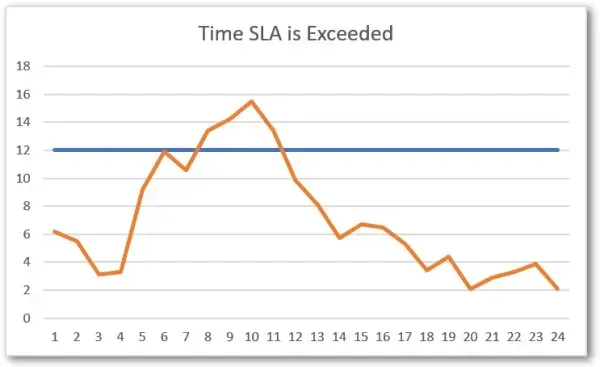
The model object calculates the percentage of time you will meet your SLA for responding to and resolving a request. Time-based graphs then show the hours when SLAs will not be met. This “time plot” lets you spot patterns and adjust staff before problems happen. Because the whole call center runs as a virtual model, you can test staffing levels, demand swings, and process changes before committing to them, and right-size the operation without guesswork.
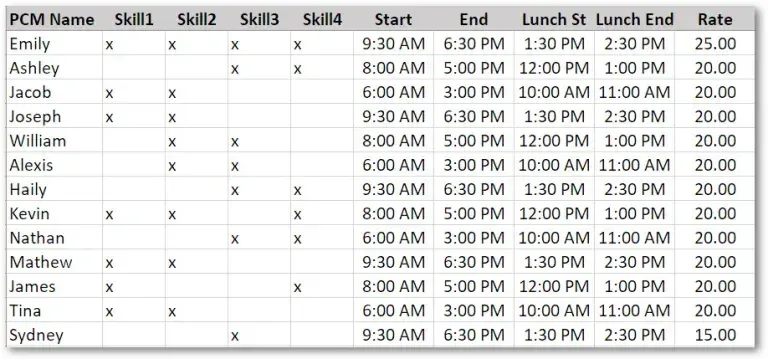
You can add a new skill (or customer) and see the staffing changes you need in just minutes. A single entry form holds all employee information in one place, including each person’s shifts and skill assignments. So yes, you can define unique shifts for different employees from one interface. You could set up 30 or more employee shifts on a single page, and weekly hours are calculated automatically so you stay within DOL guidelines.
What do you need?
Employee information
- Name
- Work start time
- Work end time
- Lunch start
- Lunch end
- Cost per hour
- Skills trained
Call center hours
- The hours considered work hours
How long does the Inbound Call Center Model Object take to set up?
Call center simulations are normally tricky to build and change. The reason is that call centers have many employees, each trained on different skills and working different shifts, and managing all those people is hard to describe in a model.

Calculating SLAs for on-shift time (not counting the hours the center is closed) is a little tricky. Selecting the oldest waiting call from many queues is genuinely tricky. And adding stats and SLAs automatically for new skills is trickier still. The Inbound Call Center Model Object handles all of this for you. You do not need to develop anything, you just fill in the blanks.
A recent simulation study needed less than one day to analyze the call data and build the model. The call center had 15 unique skills and 28 employees. The customer was pleased with the speed of development and started making improvements on the first day.
How does the Inbound Call Center Model Object work?
There are just a few simple steps.
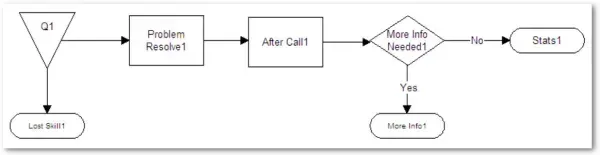
- Copy and paste the call center model elements for each new skill. Each set of skill activities assigns the right personnel, sets up the inputs for processing times, and collects SLA statistics for the new skill.
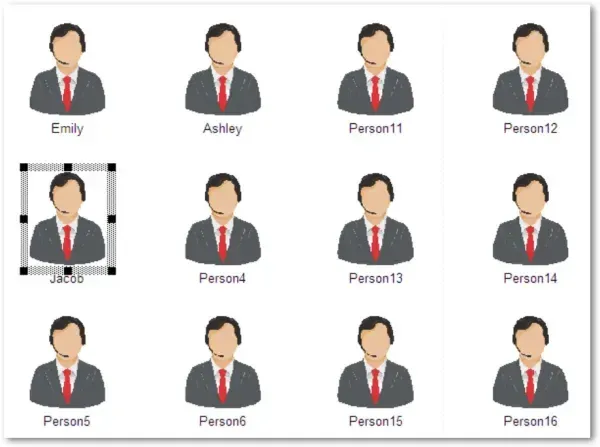
- Add or remove resources to match your call center roster.
-
Enter the processing distributions for each skill. Update the distributions that define processing times for inbound calls and emails in the scenario parameters dialog.
-
Export the model data.
-
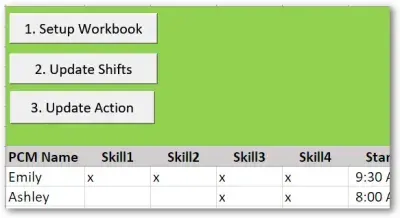
Update the call center input sheet by pressing the Update Workbook button. This populates the spreadsheet with the roster of workers you added in the model and adds their skills to the spreadsheet.
-
For each person on the spreadsheet, fill out their information: the skills they are trained on, work hours, lunch time, pay rate, and the days they work.
-
Select the Update Shifts button. Every resource shift is created, updated, and attached to the correct resource.
-
Select the Update Action button, and all of the action logic in the model updates to select only the resources with the skills identified in the input sheet.
That is it. You have built the model. Attached to it is an easy interface to modify, the resources are set up, and the detailed logic has been imported. All that remains is to enter the arrivals for the different skills.
The Inbound Call Center Model Object delivers a capability that very few people could build on their own. The details have been worked out over months. It is a free addition when you update your model objects. If you would like a copy sent to you, write to support with the message: “Send me the call center model object.”
The Inbound Call Center Model Object solves many problems for inbound call centers. If you need help tailoring it to your specific needs, contact ProcessModel support and we will walk you through the options.