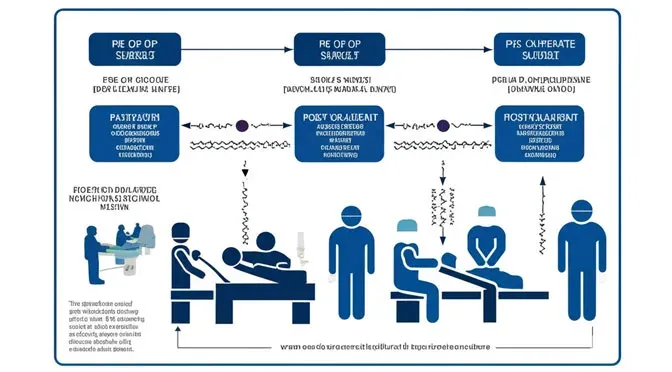

A major hospital group set out to model overall patient flow by reading in its own patient records. A template supplied by ProcessModel converts that record information into a simulation model. A model of the overall flow gives the hospital a clear view of when a department will be overcrowded and by how much. Once the problems are visible, new strategies and tactics can be tested to remove them before they ever occur.
Why model overall patient flow
Changes to a complex hospital system are easy to imagine but hard to implement. There are so many dependencies that, in the past, the only way to make changes was trial and error. The trouble is that the trial and error was mostly wrong, causing patient delays, overcrowding, and frustration for patients and staff alike. The hospital wanted a better way to predict the outcome of a change without creating those delays in the first place.
One goal was to increase the number of surgeries performed. But it was hard to understand which types of surgeries could be increased consistently, and on which days, using the existing analysis methods. The solution was to build a simulated model of the real system and try changes in the computer before implementing them.
The team found it could take actual patient data (department, length of stay, and flow) and use it to create an accurate representation of what really happened. With that representation in hand, they could try different ideas and show what would have happened had a change been in place. Rather than relying on predictive distributions to build the model, they used actual patient data, which has three major advantages:
- It is easy to understand. Because you know what actually happened, the model is easy to verify.
- The model is simple and quick to design, since a ProcessModel template provides the structure and main components.
- The data can be gathered and formatted quickly from the existing database.
The team stripped the patient database to find every point of entry by date and time. The three main entry points were the emergency department (ED), surgery, and direct admit. For each entry point, they captured all the departments visited along with the associated start and end times. They were only interested in the departments used as boarding areas. A patient may visit many departments during a stay, but the main limitation is the capacity of the boarding areas. For example, a patient may be taken from the ED to radiology while the bed is not released. The factor limiting acceptance of another patient into the ED is the number of beds, not the capacity of radiology. In a ward, it is not unusual for many departments to be visited without releasing the patient’s bed.
The key is to look at the “in” and “out” time stamps for each department. If one time stamp is fully encompassed within a longer one, exclude the shorter department and its time stamps from the analysis. The output from a single patient record, with only the boarding departments included, looks like this:
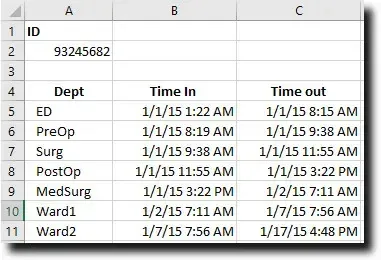
With this data, you know the entry point, entry time, length of stay, and the next department, which is everything needed to move an entity (the patient) through the model. Combined with the other patient records, the team had a complete picture of what happened in the hospital over any selected period. A model of this kind is easy to check, since you can compare actual census records against the model census for the same date.
To import the information into ProcessModel, the data had to be structured to fit a provided Excel template. Each patient record was translated into a single line, with the in and out time stamps converted into decimal hours for length of stay. The template below shows an example built from the record above:

The team used the spreadsheet to format and transfer all the patient records into the template, which converts the data into a format ProcessModel can read as a scheduled arrival. The attribute values on each row are transferred into the action logic of the arrival. For clarity, a single arrival is shown imported into the scheduled arrival dialog below:
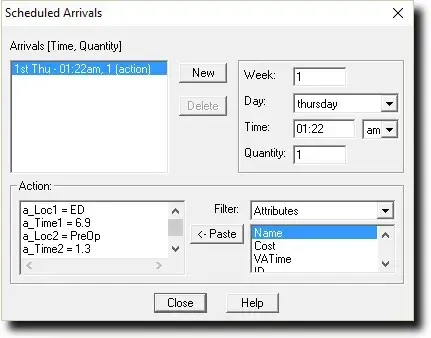
The attribute named a_loc1 tells the model the first location for this patient. The attribute a_Time1 tells the model how long the patient will stay in the first department. Linking the template to the model takes about 30 seconds, and during the update, thousands of lines of patient records can be read into the model in less than a minute.
Use the model template to model overall patient flow
Developing the model was easier than any model the team had built before, because the structure was already provided in the ProcessModel template. All they had to do was rename the activities to match their departments and add any extra departments. The model supplies a list of default descriptors, and the team created a list that matched their own departments. Descriptors represent the names of departments. They are usually short names and must be unique from the activity names. The team simply added an “m_” prefix to each descriptor. Descriptors only need to be added to the first attribute, and the rest can be left blank, which makes changing them easy. Action logic had to be modified in each department activity to use the new descriptors, but the provided structure gave an easy example to follow.
One of the more vexing problems the team had faced in the past was how to implement discharge windows, which had seemed almost impossible to model. The template included a method for creating them. By changing a single distribution, the time at which a patient was discharged could be shifted into a specified window. That was very helpful for seeing the impact of opening capacity faster to allow more surgical starts.
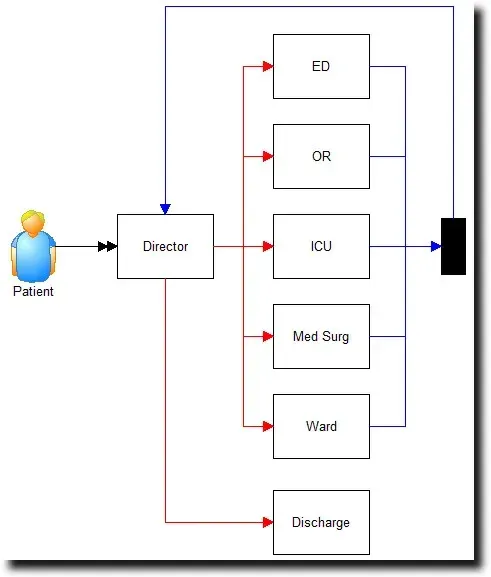
The only part of the model that was difficult, and not included in the template, was inserting new patients. Using the template, the team could recreate what had already happened, but new patients needed probable paths and distributed times to predict what would happen with additional surgeries. They reviewed statistics for many surgeries to determine the distributions for the departments visited and the time spent in each. This let the model run with different types of added surgeries and show the predicted impact.
The team used daily pattern arrivals, which set the day of the week and time of arrival for the rest of the run, and included the class of surgery. When these new arrivals enter the model, they go to a submodel where they receive all of their location and time attribute values from distributions. It was easiest to break the surgery types into separate paths to cut down on the logic in each activity. This section, used to generate the path and times for new patients, was placed in a submodel to keep the main layout clean.
Model overall patient flow to find bed capacity opportunities
Building a model of the overall patient flow let the hospital immediately identify 4 new surgical opportunities per week without exceeding the capacity limits, or the reserve capacity limits, required by the emergency department. The team is working toward additional opportunities by discharging earlier. Moving discharge times earlier in the day requires a cultural shift and will take further projects and time.
This project was valuable because it took low effort to find quick, patient-centered, and financial returns. The model also helped the affected departments see the capacity opportunities and the issues for themselves. The same technique can be transferred to other areas of the hospital, and the team plans to use it next to help make changes to the surgical center.
If shortening emergency department waits is part of your goal, see our guide on how to reduce emergency room waiting time using process simulation. To put the same approach to work in your own facility, explore what ProcessModel does.