
Queue preloading seeds the queues and storages in your model with entities before the run begins. It is a practical trick for large models, where it cuts the time the simulation needs to spin up.
Why preload queues?
Preloading exists to shorten the climb to steady state. A model that starts empty has to fill before its numbers mean anything, and that warmup can eat a meaningful slice of run time. Seed the queues instead and you can eliminate the warmup entirely.
For example, the US Social Security Administration builds a model for every major adjustment to their systems. The models are large and carry hundreds of thousands of entities. To shorten run time, they preload all the major queues so the model starts in steady state and answers questions quickly.

How to preload queues
Use the following steps to preload the queues:
-
At each activity where you need to preload, add a storage.
-
Create an extra arrival from the entity to the preload storage and set the arrival quantity to the preload amount.
-
Create a percent route from the storage to the activity.
Note: Introducing entities anywhere other than the start will skew your statistics. The steps below correct for that.
-
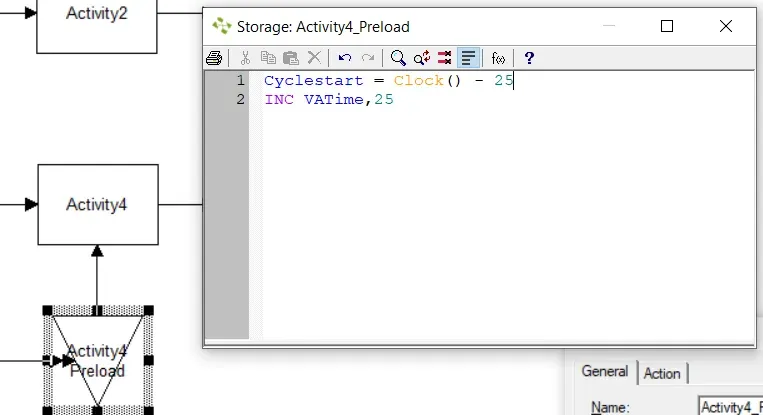
Add this action logic to the storage, where 25 is the time it would have taken an entity to reach this point in the simulation:
Cyclestart = Clock() - 25This tells ProcessModel that the entity entered the simulation 25 days earlier.
Note: The simulation time in this model is set to days. If it were set to hours, you would write the value as 25*24.
-
After the logic above, add this to the same storage, where 25 is the combined value-adding time of the steps before this activity:
INC VATime,25
With the queues seeded and the statistics corrected, the model opens in steady state and is ready to answer questions without waiting on a warmup. For the broader workflow these steps fit into, see the step-by-step guide to building models, or explore what ProcessModel can do.