A United States window manufacturer built a mixed-model manufacturing simulation in less than four hours. The line runs many products at once, each with its own timing, resources, and assembly requirements. This article shows how to simplify that kind of modeling, stay completely confident in the model and its results, and get to a decision far faster than usual.
Why conventional modeling is slow
The most common reason to build a model is to settle a hard question. We model because the whole interaction can be captured and explained in one place, and we want to be confident in the answer.
The traditional path gets there slowly. Statistical models are built by analyzing past data to predict what could happen in the future, and every statistical model has to go through a rigorous, time-consuming process to be proven before anyone trusts it. That investigation and validation is where most of the modeling time goes.
An alternate approach
There is another way: use actual data from a previous period to drive the model directly. For a manufacturing facility, real orders already supply quantity, routing, setup time, batch size, work time, and the rest. No fitted distributions are required for this technique. Testing is straightforward, because known inputs are expected to produce known outputs. Feed in a past production plan and check the result against the production reports that period actually generated.
Some of the advantages of Real Data Modeling:
- Lightning-fast model builds
- Simple, quick validation, because you compare actual inputs against known outputs
- Very high model accuracy
- Change the model by changing the input
What is the foundation of Real Data Modeling?
Keep it manageable. If a proposed change would have made a difference last year, it will probably improve this year’s production too.
Use simple comparisons to find improvements. Stop the simulation when the production orders complete and record the hours required. Make a change, run the model again, and compare the new hours against the recorded baseline. Calculate the improvement, and keep the comparison simple.
In a short time, the company was answering questions such as:
- Which products should be produced in close order?
- Which products should be separated in the production order?
- What are the best batch sizes?
- What will improve production?
- Where are the best investments to boost production?
The model became a quick alternative to running a kaizen study. Ideas became experiments and were tested immediately. As a result, the company increased production by more than 32%, and the project cost less than any of their previous efforts.
How to build a Real Data model
There are three main steps to a Real Data model:
- Create a model that handles multiple part types.
- Use a pre-built spreadsheet to import production data.
- Import the data and run the model.
Create a model to handle any part type
Design the model to be generic. Build it so that an attribute defines the processing time at each step. In many cases the attribute can sit right in the time field of the general tab.
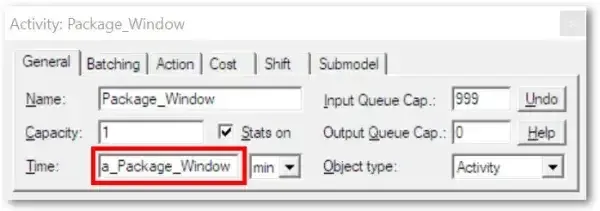
More complex interactions, such as defining which resource is required for specific parts, can be handled in the action logic tab.
Use a pre-built spreadsheet to import production data
ProcessModel ships with more than 20 model objects, several of which import data from spreadsheets. Model objects are ready-made building blocks that simplify complex modeling operations, and importing arrival data is one of those operations. You will find the model objects on the top menu bar.
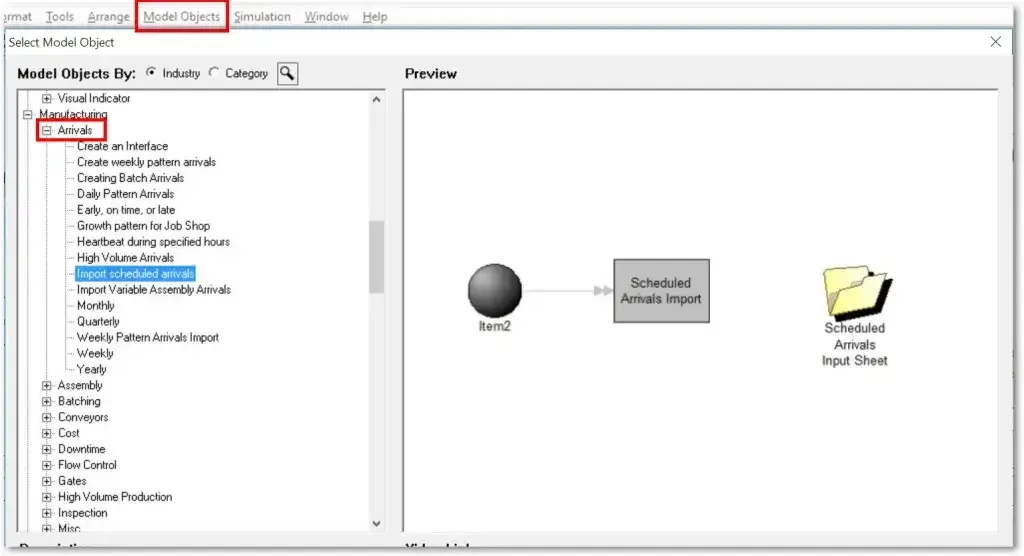
The scheduled arrival import spreadsheet lets you specify the production time for each part at each station. This data can be pulled straight from company systems and imported in seconds.
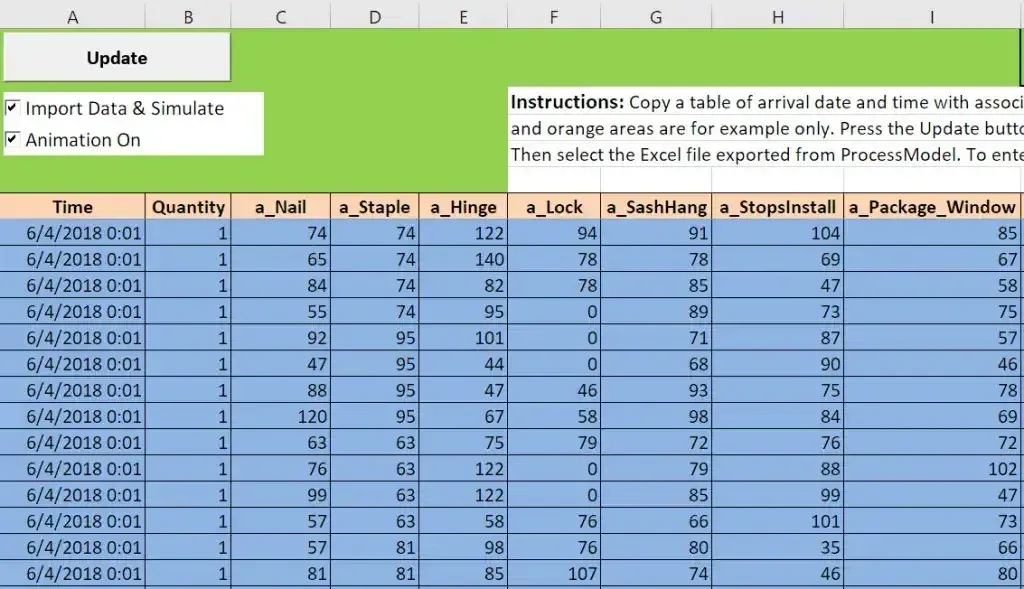
Real Data Modeling lets you build and experiment with models in a fraction of the time normally required. Faster modeling and analysis means quicker decisions, and quicker decisions mean improvements land while the issue is still the focus of management attention.
If you want to put this technique to work, start with a step-by-step guide to building the model, or see how ProcessModel handles data import and simulation.