
This page is the running history of ProcessModel releases. The most recent version sits at the top with the fullest detail, followed by a reverse-chronological record of what each earlier version added. The current flagship is version 6.2, which brings artificial intelligence directly into how you build and interpret simulations.
ProcessModel 6.2
Version 6.2 is a transformative update that bridges the gap between complex data and actionable business intelligence. It introduces a suite of AI tools designed to remove the “blank page” problem and turn simulation data into deep, strategic insight. For years our mission has been to help you visualize, analyze, and optimize complex processes. With 6.2 we take a large step forward by integrating advanced AI directly into your workflow, reducing the time from problem definition to actionable insight. The two headline capabilities are Build AI and Analyze AI.
Build AI: go from idea to model in minutes
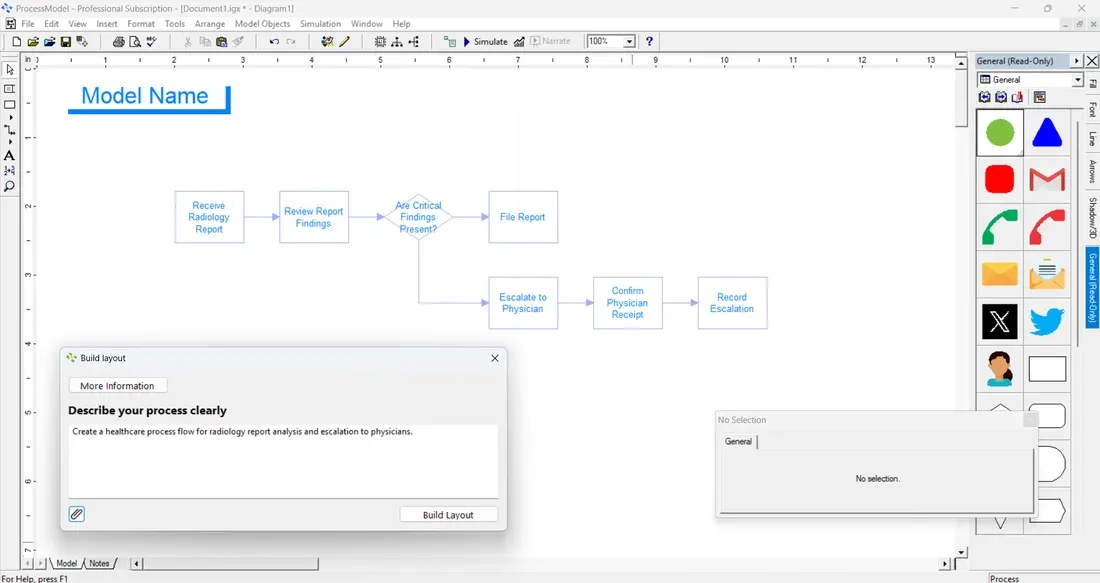
Starting a complex simulation from a blank canvas can be daunting, and Build AI changes that. This dialog-based tool lets you jumpstart model creation using natural language. Describe the process you want to simulate in plain English, paste in a list of steps, or even upload an image of a whiteboard flowchart or sticky notes. Build AI interprets your input and generates the foundational structure of your ProcessModel, so you are editing a real starting point instead of staring at an empty page.
Analyze AI: deep insights, instantly
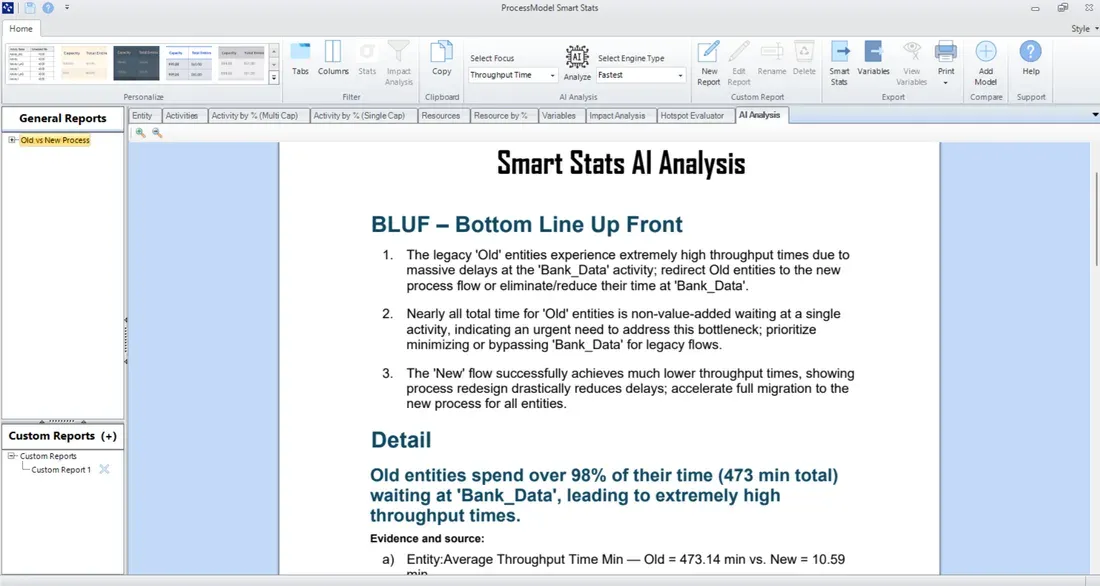
Running the simulation is only half the work; interpreting the data is where the real value begins. The new Analyze AI tab, built directly into Smart Stats, acts as your expert data analyst. It reviews the simulation results and uses advanced AI engines to provide deep, written insights. It automatically highlights critical findings about throughput time, quantities processed, costs, and resource utilization, helping you spot bottlenecks you might otherwise miss. Security is built in: the installer includes options to manage AI features based on your internet access and security policies, including localized engine options that balance speed against capability.
More in 6.2
Beyond AI, version 6.2 adds features that speed up everyday modeling and harden the platform:
- Intelligent one-click re-layout, with toolbar buttons that automatically rearrange your whole model, or just selected objects, into clean vertical or horizontal orientations. A new terminal auto-generation step finds unattached routes during a re-layout and connects them to new terminate shapes, and full undo and redo support covers layout actions.
- Enhanced security, with all major system files, including the application and the installer, now digitally signed. This improves security and significantly reduces false positives from antivirus software.
- A modernized look, with updated, higher-resolution icons throughout the application and toolbars.
- Windows 11 compatibility fixes, including taskbar icon caching issues, plus fixes for Smart Stats freezing on specific demo models, report resizing glitches, and Process Efficiency Target colors displaying correctly.
Existing maintenance and support customers can upgrade today at no additional cost. If you are new to ProcessModel, you can request a trial to try it.
ProcessModel 6.1
- Process Efficiency calculates the efficiency of each entity in your process, and Weighted Overall Process Efficiency aggregates those values into a single holistic view that weights each entity by its contribution, so you can prioritize the changes with the highest impact.
- Impact Analysis reveals which modifications create the most significant improvements, and the Hotspot Evaluator builds on it to visually pinpoint the top ten areas that will deliver the biggest results.
- Service Level Agreements let you set an expected target and a required service level on any time-collecting variable; the achieved value turns green when the goal is met and red when it is missed, with no manual calculation. One example model for the Social Security Administration reports sixteen SLAs using only two variables, where manual calculation would have needed eighty.
- Custom report upgrades, including a Stats picker to isolate key statistics for comparison, filtered stats, time series charts, histograms, and state or utilization charts.
ProcessModel 6.0
- Custom reports let you place any statistic in any position with custom graphs, tables, titles, and text, with auto-adjustment as reports expand or contract, plus one-click themes offering five report designs.
- Smart Stats automatically switches between a single replication, multiple replications, and multiple scenarios, and can compare multiple models on the same report, showing available data and clearly flagging anything missing rather than crashing.
- The trial became a personal license: after the trial period the software stays active indefinitely as a limited personal version, supporting up to twenty-five elements, optimization, curve fitting, five replications, and a 168-hour run length, so it works as an ongoing learning tool.
- Object notes let you attach detailed, formatted documentation to any object with F6; an “N” marker appears on the activity and the note never separates from it or takes up layout space.
ProcessModel 5.6.5
- Automation and one-click updates: ProcessModel can open a model, import data, simulate, and download results to Excel, giving decision makers a one-click path to process improvement recommendations.
- Safer data import, with error checking and instant reports detailing the import or the reason for a failure, plus the ability to add variables, attributes, and scenario parameters during an import.
- Two hundred model objects improved, including whole-model resource assignment from a single page, resource groups that assign many resources with one word, and per-hour resource counts.
- Fixes for background-save conflicts during imports, search and replace now updating both the graphic and its dialog, the Hotspot Evaluator filter saving its settings between runs, a smaller installer, and enhanced digital signatures on all executables.
ProcessModel 5.6.3
- New output reporting: sort any report by any field, alphabetize by activity name or rank by greatest waiting time, highlight and copy any portion with headers included, and filter without re-running the model.
- Large variable export to Excel, lifting the old 32,000-line limit to more than one million lines so you can run deep analysis such as resource bottleneck studies.
- Contextual help that pinpoints each element to specific information, with concise explanations and detailed examples for new and seasoned users alike.
- A unified Attributes, Variables, and Scenario Parameters dialog with sorting, incrementing name suffixes, and import from Excel, plus a new BPMN palette and easier action logic editing.
ProcessModel 5.6.2
- Autocomplete action logic, with a new action tab adding more than one hundred capabilities, including autocomplete with tooltips, color coding, find and replace, line numbers, brace matching, and logic folding.
- Integrated output, combining the detail and summary reports into one tabbed report that is faster to open on large models, with sortable headings, in-place copy with headers, and per-tab filters.
- Larger Excel data exchange, so each action statement can handle over 32,000 characters and complex action logic imports without truncation.
- New training videos to help new users get the basics on demand before live training.
ProcessModel 5.6.1
- Instant Graphics: new industry icons plus a service that produces a ProcessModel-ready graphic on request, properly sized, labeled, and ready to use, included with maintenance and support.
- Doubled cell export size, raising the per-cell limit from 2,200 to 4,000 characters for greater flexibility when exporting and importing action logic.
- Improved templates for importing overall entity flow and timing, letting you link real historical data to a model in about a minute so the model mimics the past and needs less validation.
- Security adjustments that let you license without involving IT, validated in a beta test with more than four hundred people across different companies.
ProcessModel 5.6
- Build an interface to your model: make changes to all areas of a model from an external interface that can be created in about two minutes, with an included template.
- A scheduled arrivals importer that reads in thousands of arrivals, fully formatted, in seconds, with all the attributes needed to define routing and timing.
- 165 new model objects, self-contained plug-in sections that hold the activities, logic, attributes, and variables needed to run when dropped into a model, and that can be updated in seconds without reinstalling.
- Multiple calls to the same submodel from different activities, with the submodel returning to the activity it left from automatically, plus integrated help linked to the user guide and blog, and licensing that no longer requires admin privileges.
ProcessModel 5.5
- Industry-specific installs that provide example models, model objects, and icon palettes tailored to your industry, so a healthcare user sees triage and admitting segments rather than manufacturing icons.
- Automatic licensing in about twenty seconds using only your email address, with quick license transfers and a manual option still available.
- A single common file format that removes the need to save packages, with automatic backups and quick recovery, compatible back to version 5.3.
- Model objects, model narration, new palettes, and error management: reusable building blocks for difficult modeling, narration with pictures, voice, or video, scores of new icons across industries, and tools to catch the errors that complex models can introduce.
Existing customers with active maintenance and support can upgrade for free from Help, Check for Updates. To see how these capabilities fit your work, explore the product or start a trial.